











Veo 3.1 API Pricing - Quality, Fast and Lite per 8 s Clip
Veo 3.1 API pricing for Quality, Fast and Lite: flat price per 8-second clip at 720p, 1080p and 4K, which tier to pick, and Python and curl examples.
 Piotr Olszewski2026-10-029 minPolski
On Jantaris, a Google Veo 3.1 clip costs from $2.53 per video with Veo 3.1 (Quality), from $0.354 per video with Veo 3.1 Fast and from $0.177 per video with Veo 3.1 Lite. Every generation is one 8-second clip at a flat price, and 720p and 1080p cost the same, so the only upcharge is 4K. No Google AI subscription, no Cloud project setup: one API key, a prepaid balance from $10, and the cost returned before the task runs.
Veo 3.1 API pricing at a glance
Veo on Jantaris is billed per video, not per second. The clip length is fixed at 8 seconds, so the per-generation price is the price of an 8-second shot.
| Tier | 8 s clip, 720p or 1080p | 8 s clip, 4K | Input |
|---|---|---|---|
| Veo 3.1 (Quality) (Quality) | from $2.53 per video | about 1.5 × the 1080p price | text, up to 3 images as frames |
| Veo 3.1 Fast | from $0.354 per video | about 4.6 × the 1080p price | text, up to 3 images (frames or appearance references) |
| Veo 3.1 Lite | from $0.177 per video | about 8 × the 1080p price | text only |
Exact numbers per resolution are on each model page and on the pricing page. Global prices are in USD, excluding taxes.
What the table means in practice:
- 1080p is free compared with 720p. Same price, so I only pick 720p when I want a smaller file.
- Quality costs several times more than Fast. Irrelevant for one hero shot, very relevant for twenty variations.
- Lite stops being a bargain at 4K. At 1080p it is half the price of Fast, but at 4K the gap almost closes. For 4K I use Fast or Quality, which also accept images.
A failed generation costs $0: when a task ends as failed, the hold on your balance is released in full. A finished clip you don't like is charged, so I explore ideas in Fast and send only the final prompt to Quality.
Quality vs Fast vs Lite: which Veo 3.1 tier to use
Google ships three Veo 3.1 tiers. All of them output 16:9 or 9:16 at 720p, 1080p or 4K and take prompts up to 4,000 characters. They differ in quality and in what they accept:
- Veo 3.1 (Quality) - the best image: lighting, texture, detail. Up to 3 images used as frames, for example the opening frame. This is my pick for shots that get published.
- Veo 3.1 Fast - faster and much cheaper. Images can act as frames or as appearance references (a character, a product). My default for social clips and tests.
- Veo 3.1 Lite - the cheapest tier, added in March 2026. Text only, so you describe the whole scene in words. Good for backgrounds, cutaways and many variations of one idea.
Every clip is 8 seconds. Longer scenes get cut together from several shots. If you need one long take with audio, look at Seedance 2.5 (up to 30 s) or Gemini Omni, which has longer clips and video references; the Gemini Omni API guide covers it.
Veo 3 vs Veo 3.1
Plenty of people still search for "Veo 3 pricing". Google introduced Veo 3 at I/O on 20 May 2025 as its first model to generate picture and sound in one pass. Veo 3.1 replaced it on 15 October 2025 with better prompt adherence and first/last frame control. The Gemini API price list now only has 3.1 tiers, and Jantaris does too.
Audio in Veo 3.1
Google designs Veo 3.1 to generate sound along with the picture: effects, ambience and lines of dialogue you put in quotes. On Jantaris the Veo form has no audio toggle and there is no audio surcharge; each tier has one price per clip.
Two practical notes:
- If the soundtrack matters, render one test clip and listen to it before you queue a batch.
- Google does not publish a list of supported speech languages for Veo. English dialogue in quotes is the safe bet.
Veo 3.1 in 4K
With Google's own consumer plans, 4K is tied to the top tier. Through the API you set resolution: "4k" on any of the three tiers. The clips below are Google's official 4K showcase samples.
4K is worth it when you will crop or reframe in the edit, or when the clip ends up on a big screen. For a vertical clip watched on a phone, 1080p is plenty, and with Veo it costs the same as 720p.
Google's own Veo pricing vs Jantaris
Google sells Veo two ways; Jantaris is a third. I checked Google's numbers on 25-27 September 2026:
- Gemini API. Per second, in USD: Quality $0.40 per second at 720p/1080p ($0.60 at 4K), Fast from $0.10, Lite from $0.05. An 8-second Quality clip at 1080p is therefore $3.20. You need a Google Cloud billing account.
- Google AI plans with Flow. Google AI Pro is $19.99 per month in the US with 1,000 Flow credits; a Lite clip costs 10 credits, Fast 20 and Quality 100. Lower tiers render at 720p, and 4K is reserved for Ultra. Unused credits don't roll over.
- Jantaris. A flat price per 8-second clip, 4K on every tier, prepaid balance that never expires, and the same key for Kling, Seedance and chat models.
| Google AI plan | Gemini API | Jantaris | |
|---|---|---|---|
| Billing | credits in a subscription | USD per second | USD per 8 s clip |
| Clip length | 4, 6 or 8 s | 4, 6 or 8 s | 8 s |
| 4K | Ultra only | yes | yes, every tier |
| Unused money | credits expire | pay as you go | balance never expires |
| Other vendors' models | no | no | yes, one key |
If you already pay for Google AI Pro for Gemini or storage, a few Fast clips a month come included. If you build an app, run batches from code, or want Veo next to Kling and Seedance under one key and one balance, a per-clip price is simpler to plan around. Per-second costs across vendors are compared in AI video cost per second.
My Veo 3.1 Fast test
On 27 September 2026 I gave Veo 3.1 Fast two prompts that several other video models got as well: coffee poured into a cup, and a yellow-and-red Warsaw tram in the rain at dusk. These were 4-second clips at 720p with audio through Google's API (on Jantaris, Veo clips are always 8 seconds), one take each.
- Coffee: 8.5/10. The stream lands in the cup, the level rises, steam and shafts of sunlight. The best coffee of the whole comparison.
- Tram: 7.5/10. Colors, raindrops and reflections are right, but the tram covers the whole street up to the camera in 4 seconds, too fast for a city.
- Speed: 52-54 seconds from request to file, the fastest in the test.
- Audio: a soundtrack was there, with no music or speech I hadn't asked for.


Lesson for prompts: with moving vehicles or people I add "slowly" or "static camera on a tripod", because 8 seconds tempts the model to pack in too much action. More camera phrases are in AI video prompts and camera moves.
Generating a Veo clip in Studio
- Open Jantaris Studio and pick Veo 3.1 (Quality), Fast or Lite.
- Write the prompt like a shot description: location, time of day, camera move, action.
- Choose 16:9 or 9:16.
- Choose the resolution. 1080p costs the same as 720p; 4K costs more.
- On Quality and Fast, expand "Reference images" to add up to 3 image URLs.
- Check the "Cost" line and click "Generate".
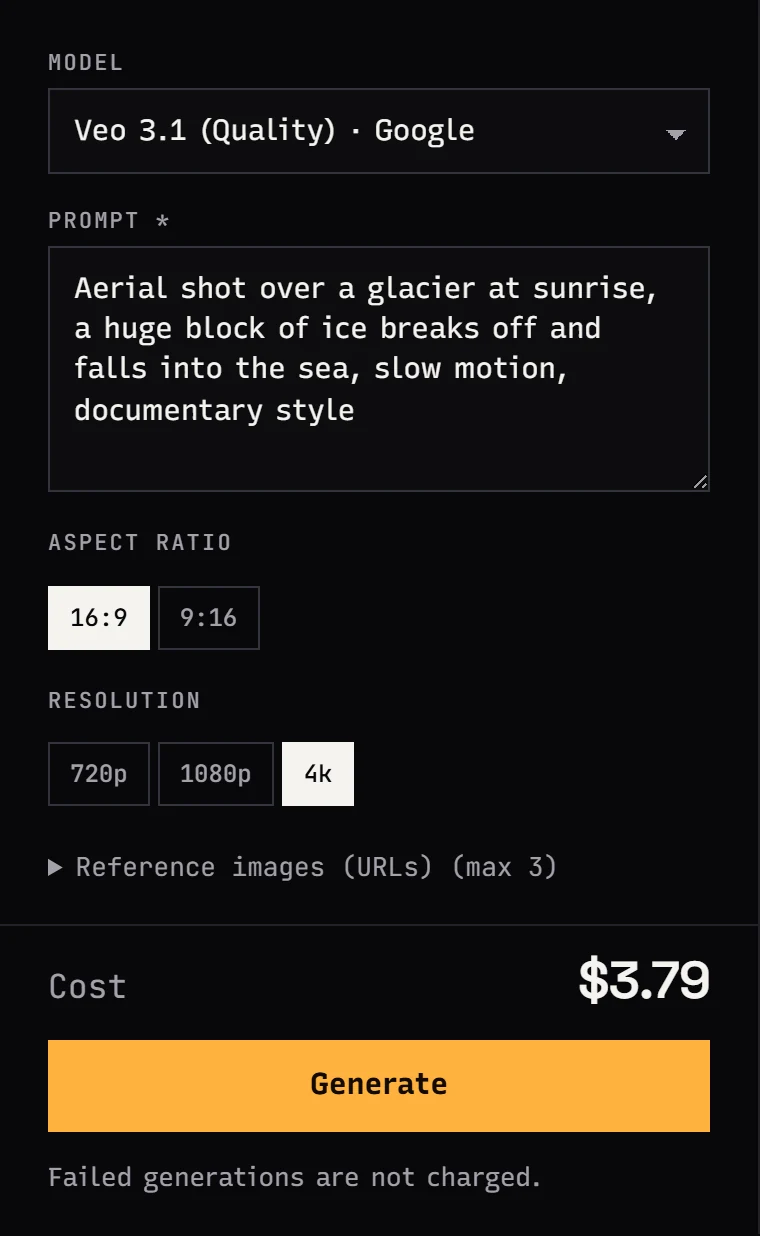
There is no duration field, because every Veo clip is 8 seconds.
Veo 3.1 API examples
Start with prices. The public catalog endpoint returns current rates for all three tiers, no key required:
import requests

for model in ("veo-3.1", "veo-3.1-fast", "veo-3.1-lite"):
    m = requests.get(f"https://jantaris.com/v1/models/{model}", timeout=30).json()
    prices = ", ".join(f"{v['resolution']}: ${float(v['amount']):.3f}" for v in m["pricing"]["variants"])
    print(f"{m['name']:<20} {prices} per 8 s clip")
A vertical Fast clip with an image as the opening frame:
curl https://jantaris.com/v1/generate \
  -H "Authorization: Bearer $JANTARIS_API_KEY" \
  -H "Content-Type: application/json" \
  -d '{
    "model": "veo-3.1-fast",
    "input": {
      "prompt": "The camera slowly circles the perfume bottle on a marble table, morning light moves across the glass, soft ambient sound",
      "aspect_ratio": "9:16",
      "resolution": "1080p",
      "image_urls": ["https://your-site.com/files/bottle.png"]
    }
  }'
And the same flow in Python, waiting for the result:
import os, time, requests

API = "https://jantaris.com/v1"
H = {"Authorization": f"Bearer {os.environ['JANTARIS_API_KEY']}"}

task = requests.post(f"{API}/generate", headers=H, json={
    "model": "veo-3.1",
    "input": {
        "prompt": "Drone shot over a glacier at sunrise, a huge block of ice breaks off and falls into the sea, documentary style",
        "aspect_ratio": "16:9",
        "resolution": "4k",
    },
}).json()
print("estimate:", task["estimated_cost"])

while task["status"] in ("queued", "running"):
    time.sleep(10)
    task = requests.get(f"{API}/tasks/{task['id']}", headers=H).json()

print(task["status"], task["cost"], [o["url"] for o in task["output"] or []])
Don't send duration; it is fixed. Images must be reachable at a public HTTPS URL. For Lite, send only prompt, aspect_ratio and resolution, since that tier rejects images. Polling and webhooks are described in the tasks docs. For a side-by-side of Veo, Kling and Seedance, see the AI video API comparison.
FAQ
How much does the Veo 3.1 API cost?
On Jantaris an 8-second clip costs from $2.53 per video with Quality, from $0.354 per video with Fast and from $0.177 per video with Lite. 720p and 1080p share one price; 4K is higher.
What is the difference between Veo 3.1 Fast and Lite?
Fast accepts up to 3 images as frames or references and has a better image; Lite is text-only and costs half as much at 720p/1080p. At 4K the two are close in price.
Does the Veo 3.1 API support 4K?
Yes, all three tiers accept resolution: "4k" at a higher per-clip price. No subscription tier is required.
Is there a free Veo 3.1 API?
The Gemini API has no free tier for Veo. Google Flow gives a small daily credit allowance in its app. Jantaris has no free tier either: the minimum top-up is $10, the balance never expires and failed generations cost nothing.
How long is a Veo 3.1 clip?
On Jantaris every clip is 8 seconds. Build longer videos from several shots in your editor.


