











Z-Image Turbo API - Price, Speed, Test and Code Examples
Z-Image Turbo API price, speed and limits: the cheapest image model on Jantaris, 9 steps, about 4 s per image on an RTX 4090. Test, weak spots, code.
 Piotr Olszewski2026-10-029 minPolski
Z-Image Turbo is an open-weights text-to-image model from Alibaba's Tongyi team, built for speed and low cost. On Jantaris it costs $0.02 per image, the lowest price of any image model in the Jantaris catalog. On my own RTX 4090 it rendered a 1344x768 image in 4-4.5 seconds at 9 steps. It handles short English text in images well and struggles with accented characters. Below: the Z-Image Turbo API in curl, Python and JavaScript, my test images, the weak spots and an honest look at running it locally versus calling an API.
What Z-Image Turbo is
Z-Image is a family of image models released by Tongyi-MAI (Alibaba) in November 2025. The Turbo version is distilled: it needs a handful of sampling steps instead of dozens, which is where the speed comes from. It has about 6 billion parameters and the weights are released under Apache 2.0, which permits commercial use.
On Jantaris the model ID is z-image and the option set is small:
| Parameter | Value on Jantaris |
|---|---|
| Mode | text-to-image only, no input images |
aspect_ratio | 1:1, 4:3, 3:4, 16:9, 9:16 (default 1:1) |
| Images per request | 1 |
| Prompt length | up to 1,000 characters |
| Resolution | not selectable, follows the aspect ratio |
| Seed | not available, every result is random |
| In-image text | English and Chinese, per the vendor |
Model page with the live price: Z-Image Turbo.
Z-Image Turbo price
One image costs $0.02 per image. Aspect ratio and prompt length don't change it. I checked the whole image catalog on Jantaris and nothing else is cheaper. For context, a few other models from the same catalog:
| Model | Price |
|---|---|
| Z-Image Turbo | $0.02 per image |
| Z-Image Pro | $0.05 per image |
| GPT Image 2.5 | $0.0432 per image |
| FLUX.2 [pro] | from $0.0688 per image |
| Nano Banana Pro | from $0.0747 per image |
As with every model on Jantaris, the cost is shown before you submit (estimated_cost), failed generations are not charged, the balance never expires and there is no subscription. Top-ups start at $10.
How fast is Z-Image Turbo
My numbers are local: ComfyUI, an RTX 4090 with 24 GB, the bf16 weights, 9 steps. Times from the test log:
| Image | Resolution | Time |
|---|---|---|
| first after start-up (model loading from disk) | 1344x768 | 478.7 s |
| second | 1344x768 | 7.5 s |
| further landscape images | 1344x768 | 4.5 s |
| square | 1024x1024 | 4.0-4.5 s |
| vertical | 768x1344 | 4.0 s |
The first image took almost eight minutes because that time includes loading the model from disk into GPU memory. It is a one-off start-up cost; on an idle NVMe drive loading usually takes tens of seconds. After that, about four seconds per image.
Through an API the time depends on the queue and server load, not on my GPU, so I won't promise four seconds there. For images, add ?wait=60 and the server holds the request until the result is ready.
What it does well: my test
All images here are mine, generated locally with the same model. Prompts were in English.

Short English text. The prompt asked for a sign reading exactly "FRESH BREW". The letters are correct, with sign-painter styling and a drop shadow. The only miss: it skipped the chalkboard and painted the words straight onto the glass.
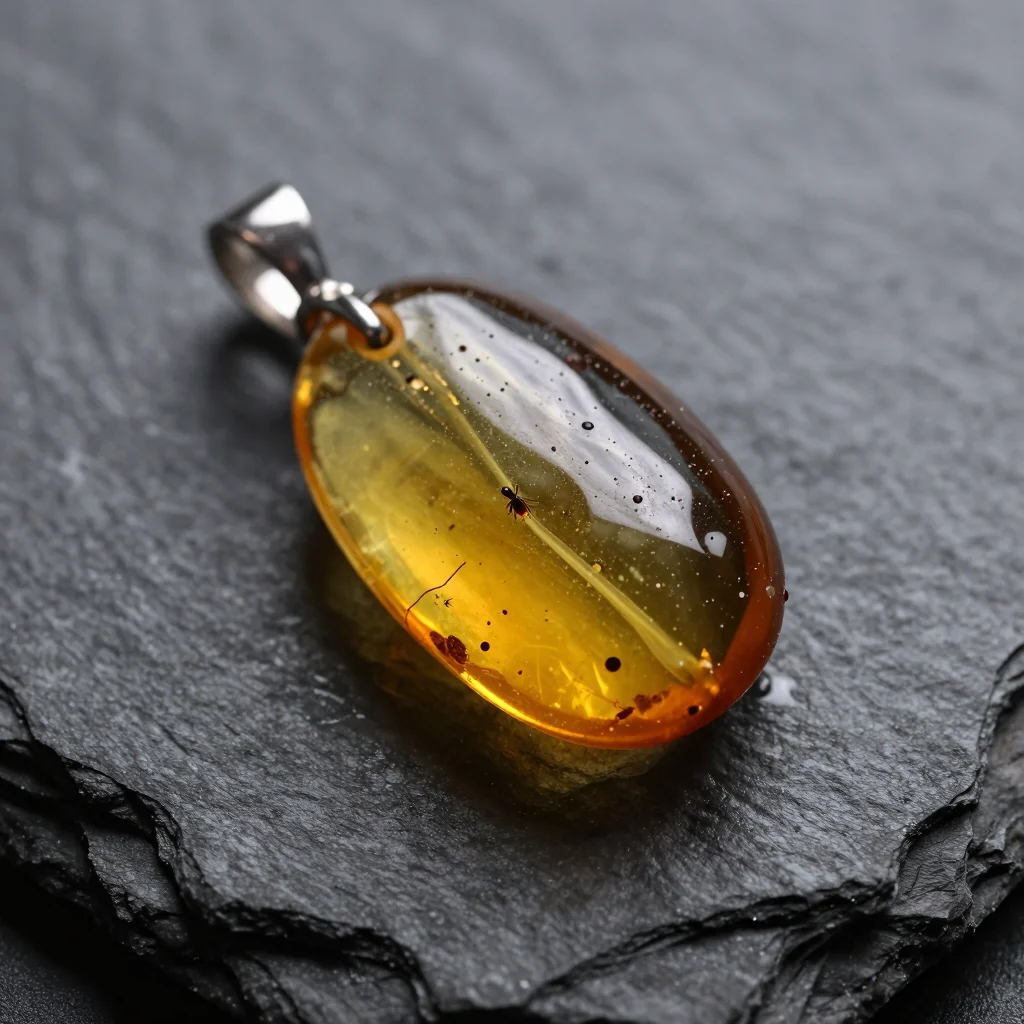

Photoreal product shots. Backlit amber, water drops on slate, shallow focus. For a model that renders in four seconds the detail is solid. Each aspect ratio produced a different insect inside, which I explain in the AI image prompt guide.

Photography vocabulary. "24mm wide lens" widened the frame, "long exposure" smoothed the waves and "blue hour" reset the whole palette.
Where it struggles
Two sources here: my own test series and an earlier local test I published on promptowy.com (in Polish), eight prompts comparing Z-Image Turbo with Qwen-Image 2.1 on the same machine.
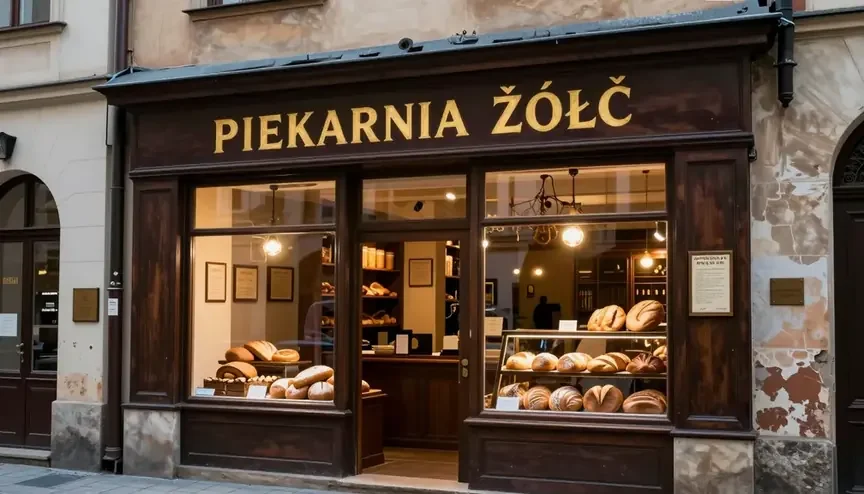
- Accented characters. The Polish sign "PIEKARNIA ŻÓŁĆ" came out as "ŽÓŁČ", with Czech carons on two letters. If your text has diacritics, add it in an editor or pick a model that handles them (see GPT Image 2.5 vs Nano Banana Pro vs FLUX.2).
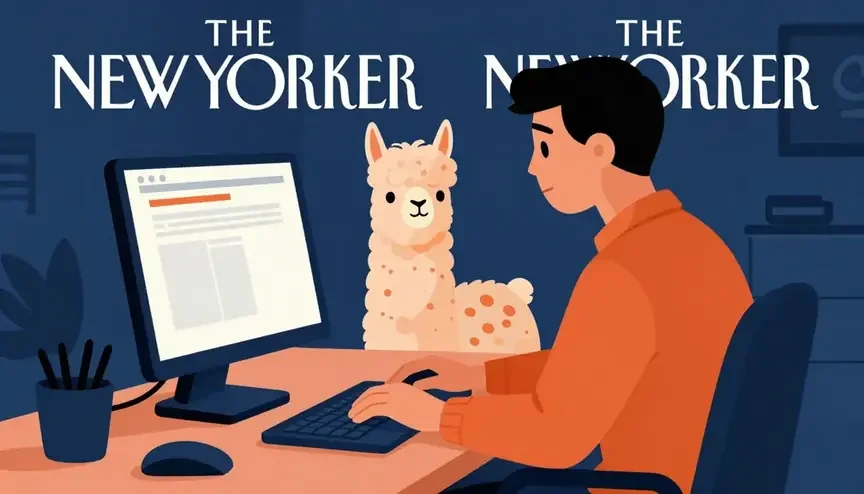
- Unrequested text. Asking for an illustration in the style of a well-known magazine made it draw that magazine's masthead twice. Describe styles in words, not by publication name.
- "No text" is not enough. In my series, a poster prompt ending in "no text" still got tiny fake captions in the bottom margin.
- Local specifics. Polish dumplings came out closer to ravioli and a Tatra lake looked alpine. General world knowledge is fine, regional detail less so.
- Overall score. In my ranking of ten image models on five identical prompts, Z-Image Turbo averaged 5.7/10, the lowest of the group; Nano Banana Pro scored 9.0. Full boards are in the image generator ranking (Polish).
None of this rules the model out. It tells you what not to use it for.
When to choose Z-Image Turbo
Use it when:
- you need a lot of images and unit cost matters (blog illustrations, backgrounds, website mockups),
- you are testing a prompt before sending it to a pricier model,
- the image has short English text or none at all,
- you want quick composition sketches in several aspect ratios,
- a script generates hundreds of variants and you discard the weak ones.
Skip it when:
- the image needs text with diacritics,
- you need to edit a photo or use references (no image input),
- you need repeatable results via a seed,
- the image is a cover or print piece where every detail counts.
Z-Image Pro: when to pay more
Z-Image Pro ($0.05 per image) is the other Z-Image model on Jantaris:
| Z-Image Turbo | Z-Image Pro | |
|---|---|---|
| API fields | prompt, aspect_ratio | prompt, seed |
| Seed | no | yes (0 or omitted = random) |
| Aspect ratio choice | 5 ratios | no such field on Jantaris |
| Prompt | up to 1,000 characters | best as one dense English paragraph, about 90-170 words |
| Input images | no | no |
Z-Image Pro makes sense when you want to return to a good image and change single words at a fixed seed. For bulk runs and sketches I stay with Turbo. I have not tested Z-Image Pro myself, so I don't compare their quality.
Z-Image Turbo API examples
The model accepts exactly two input fields, prompt and aspect_ratio. Anything else, such as seed or num_images, returns 422. Create a key in the dashboard after you sign up.
curl "https://jantaris.com/v1/generate?wait=60" \
  -H "Authorization: Bearer $JANTARIS_API_KEY" \
  -H "Content-Type: application/json" \
  -d '{
    "model": "z-image",
    "input": {
      "prompt": "photo of a small coffee shop window at night, a hand-lettered sign reading exactly \"FRESH BREW\", warm interior light, rain drops on the glass",
      "aspect_ratio": "16:9"
    }
  }'
Python, saving the file:
import os
import requests

API = "https://jantaris.com/v1"
HEADERS = {"Authorization": f"Bearer {os.environ['JANTARIS_API_KEY']}"}

r = requests.post(
    f"{API}/generate",
    params={"wait": 60},
    headers=HEADERS,
    json={
        "model": "z-image",
        "input": {
            "prompt": "macro product photo of a raw Baltic amber pendant on dark wet slate, "
                      "single warm backlight, shallow depth of field",
            "aspect_ratio": "1:1",
        },
    },
    timeout=130,
)
r.raise_for_status()
task = r.json()

if task["status"] == "succeeded":
    url = task["output"][0]["url"]
    with open("amber.png", "wb") as f:
        f.write(requests.get(url, timeout=60).content)
    print("saved, cost:", task["cost"])
elif task["status"] == "failed":
    print("failed (not charged):", task["error"])
else:
    print("still running, poll:", task["poll_url"])
JavaScript (fetch, Node 18+):
const res = await fetch("https://jantaris.com/v1/generate?wait=60", {
  method: "POST",
  headers: {
    Authorization: `Bearer ${process.env.JANTARIS_API_KEY}`,
    "Content-Type": "application/json",
  },
  body: JSON.stringify({
    model: "z-image",
    input: { prompt: "flat vector illustration of a lighthouse, limited palette", aspect_ratio: "9:16" },
  }),
});
const task = await res.json();
console.log(task.status, task.output?.[0]?.url ?? task.poll_url);
Result URLs expire after a limited time, so download files right away. For runs of hundreds of images, use webhook_url instead of ?wait=60. Batching and error handling are in generate images with a Python API, and every field is documented in the generate docs.
Z-Image Turbo in Jantaris Studio
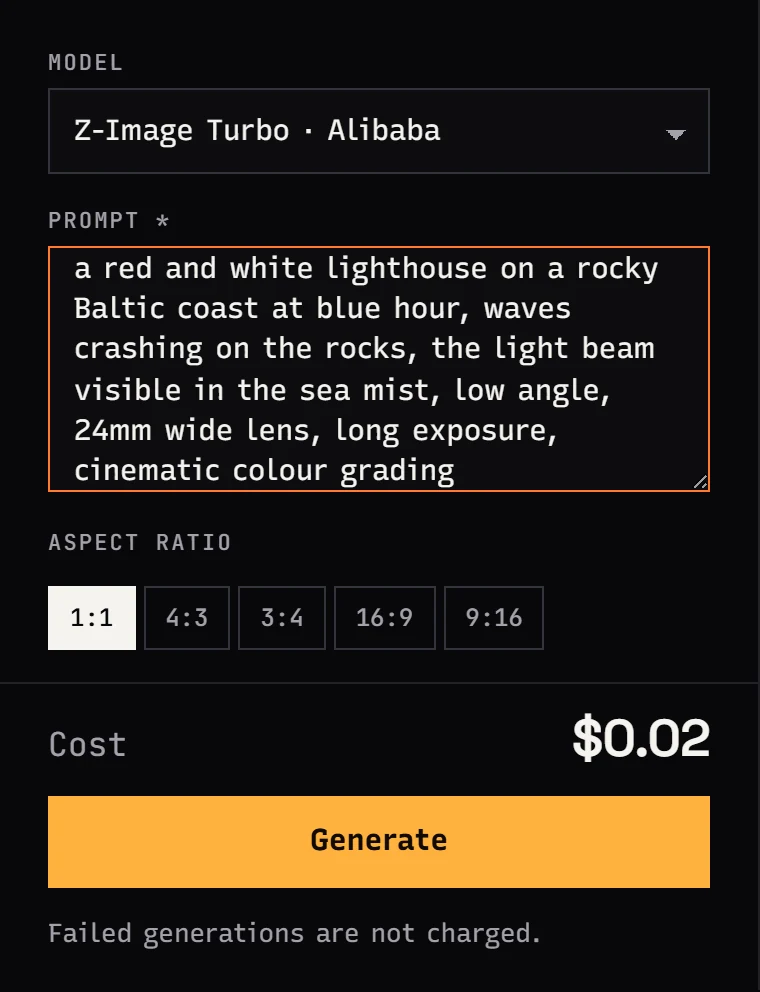
No code needed: in Jantaris Studio choose Z-Image Turbo, paste a prompt and click one of five ratios. The form has only those two fields because that is all the model accepts. Finished images stay in your generation history.
Run it locally or use the API?
Z-Image Turbo has open weights, so you can run it yourself for free if you have the hardware. A comparison based on my own install:
| Local (my test) | Jantaris API | |
|---|---|---|
| Hardware | a high-VRAM GPU; ComfyUI used up to 18.2 GB on my RTX 4090 | a browser or any server |
| Download | about 20.7 GB (model, text encoder, VAE in bf16) | nothing |
| Setup | install and configure; a few hours for me, together with other models | account, top-up, API key |
| Cost per image | electricity: roughly 0.0004 kWh per image (350 W for 4.2 s, GPU only) | $0.02 per image |
| Time per image | about 4 s once the model is loaded | depends on the queue, usually one ?wait=60 call |
| Seed and full sampler control | yes | no |
| Invoices, prepaid balance, no hardware to maintain | no | yes |
On 12-16 GB cards the model runs slower because part of it spills into system RAM. On 8 GB you will need quantized versions (fp8, GGUF), at some cost to quality.
My own split: if the GPU is already under the desk, I run long batches and seed experiments locally. I use the API when generation runs on a server, inside an automation, or for a client without a strong GPU.
FAQ
Is Z-Image Turbo free?
The weights are free under Apache 2.0, so locally you only pay for power and hardware. On Jantaris an image costs $0.02 per image. Jantaris has no free plan or starter credits, the minimum top-up is $10, and failed generations are not charged.
What is the Z-Image Turbo API price per image?
$0.02 per image, flat, regardless of aspect ratio or prompt length. It is the cheapest image model in the Jantaris catalog at the time of writing. Live prices for all models are on the pricing page.
Can I set a seed for Z-Image Turbo through the API?
No. On Jantaris Z-Image Turbo accepts only prompt and aspect_ratio. Z-Image Pro has a seed field.
Can Z-Image Turbo edit photos?
No, it has no image input. For edits use FLUX.1 Kontext [pro], GPT Image 2.5 or Nano Banana Pro.
What GPU do I need to run Z-Image Turbo locally?
In my test the bf16 version used up to 18.2 GB of VRAM on an RTX 4090 and produced an image in about four seconds. It runs on 12-16 GB cards, just slower; on 8 GB you need a quantized build.
Can I use Z-Image Turbo images commercially?
The Apache 2.0 license on the weights allows commercial use. Responsibility for what is in the image, such as real people's likenesses and trademarks, stays with you.

