










AI Text in Images - Which Models Spell Right, How to Prompt
How to get correct text in AI images: which models spell reliably (my tests), quotes and "exactly", text length, proofreading and one-word fixes.
 Piotr Olszewski2026-10-028 minPolski
Text in an AI image comes out right when three things line up: a model that can actually spell (especially outside English), the exact wording in quotes with the word "exactly", and only a few words per text element. In my tests Nano Banana Pro (from $0.0747 per image), Nano Banana 2 and GPT Image 2.5 ($0.0432 per image) wrote even Polish accented text without a single error, while FLUX.2 [pro] and Z-Image Turbo got accents wrong. Below: the test results, how to structure a text prompt, the two classic failure modes, and how to fix one word without regenerating the whole image.
Which models spell correctly
My test bench is Polish, which is a tough case: letters like Ż, Ł, Ę and Ć are exactly where image models slip. The results come from two of my tests on promptowy.com: a typography test from August 2026 (a bakery sign, a festival poster and a neon pangram) and an image model ranking from 27 September 2026 (a bakery sign reading "PIEKARNIA ŻÓŁĆ"). One attempt per task, no cherry-picking. Both write-ups are in Polish.
| Model | Accented text in my tests | Verdict |
|---|---|---|
| GPT Image 2.5 | sign correct in all six quality settings | reliable, cheapest of the leaders |
| GPT Image 2 | 0 errors across three tasks including the pangram | reliable |
| Nano Banana Pro | sign correct, four-line poster correct | reliable, best images overall |
| Nano Banana 2 | 0 errors in August, 10/10 for the sign in September | reliable, but adds text of its own |
| Seedream 5.0 Pro | August: accents in wrong places; September: correct | proofread every letter |
| Qwen Image 3.0 | August: 2 errors in a subtitle; September: correct | proofread every letter |
| FLUX.2 [pro] | errors in both tests | add text in an editor |
| Z-Image Turbo | English perfect, Polish accents wrong | English text only |
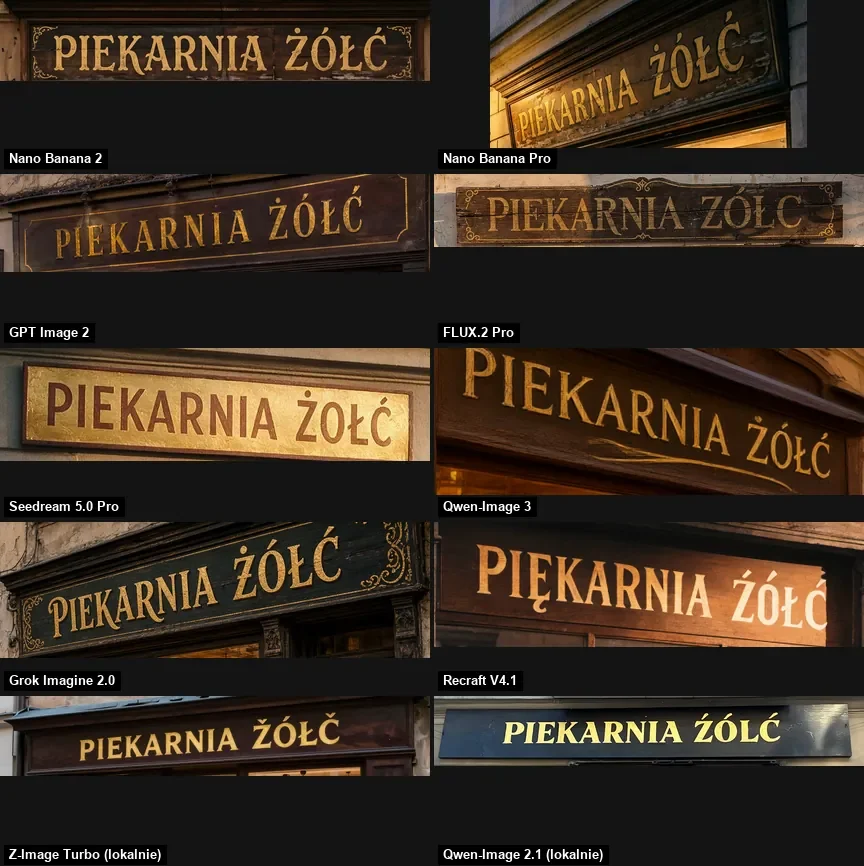
For whole-image quality rather than just text, see GPT Image 2.5 vs Nano Banana Pro vs FLUX.2 and the Nano Banana Pro vs GPT Image 2.5 comparison.
Two failure modes: missing and extra marks
Models fail on accented text in two ways. The obvious one: a mark disappears, so "Ż" becomes "Z". That is what FLUX.2 [pro] did.
The second is sneakier because it is easy to miss. In August, Seedream 5.0 Pro and Qwen-Image-3 "knew" so well that Polish has diacritics that they added them where none belong:
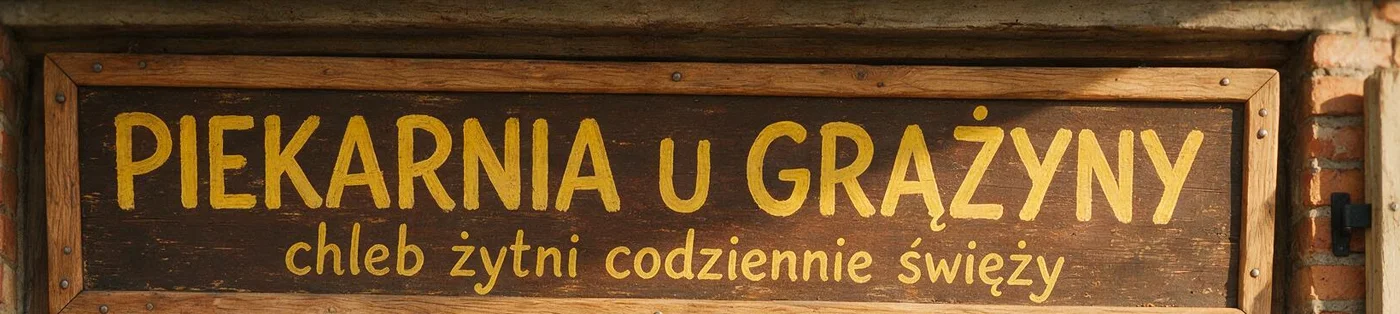


The practical rule: read AI text letter by letter against your prompt. "Looks fine" is not enough, because an extra accent at a glance reads like the right word. This matters for any language with diacritics: German, French, Spanish, Czech, Turkish and so on.
How to write a text prompt
Quotes and "exactly"
Put the text in quotes and precede it with "exactly" or "reading exactly". Type the capitalization you want to see. My Z-Image Turbo test:
photo of a small coffee shop window at night, a hand-lettered chalkboard sign in the window reading exactly "FRESH BREW", warm interior light, rain drops on the glass
The text came out flawless, with a drop shadow and sign-painter lettering. The chalkboard did not: the model painted the letters straight onto the glass. The quoted text won over the object it was supposed to sit on. If the surface matters (a board, a mug, a T-shirt), describe it in its own sentence and check the result.
Content first, design second
With several text elements, I list all the wording first, line by line, then describe the look. That stops the model from mixing sample slogans with required copy.
Flat poster design, 4:5, no mockup.
Text, exactly these lines and nothing else:
1. "NIGHT SHIFT JAZZ" (title, largest)
2. "LIVE AT THE OLD DEPOT" (subtitle)
3. "SEPTEMBER 18, 7:30 PM" (small, bottom)
Design: cream background, one navy abstract saxophone silhouette, red accent,
screen-printed look, wide margins, clear hierarchy.
How much text
- Thumbnails, banners, signs: one to three words per element. In my YouTube thumbnail test, two- and three-word captions read best.
- Posters: a title, a subtitle and one or two lines of details. In a September test, a poster with a heading and four lines of Polish came out clean in Nano Banana 2, Nano Banana Pro and OpenAI's model.
- Price lists, timetables, paragraphs: risk grows with every line. I add that kind of text in an editor.
Describe the typeface, do not name it
Models handle descriptions better than font names. Instead of "Helvetica Bold", write bold condensed sans-serif, all caps; instead of a serif font name, elegant high-contrast serif. Surfaces work too: neon tube lettering, hand-painted shop sign, embossed enamel plate, chalk handwriting.
The model adds text you did not ask for
The second most common problem after typos is extra text. In the typography test Nano Banana 2 spelled the city name and slogan correctly, then invented dates, a venue, a website address and a hashtag on its own:
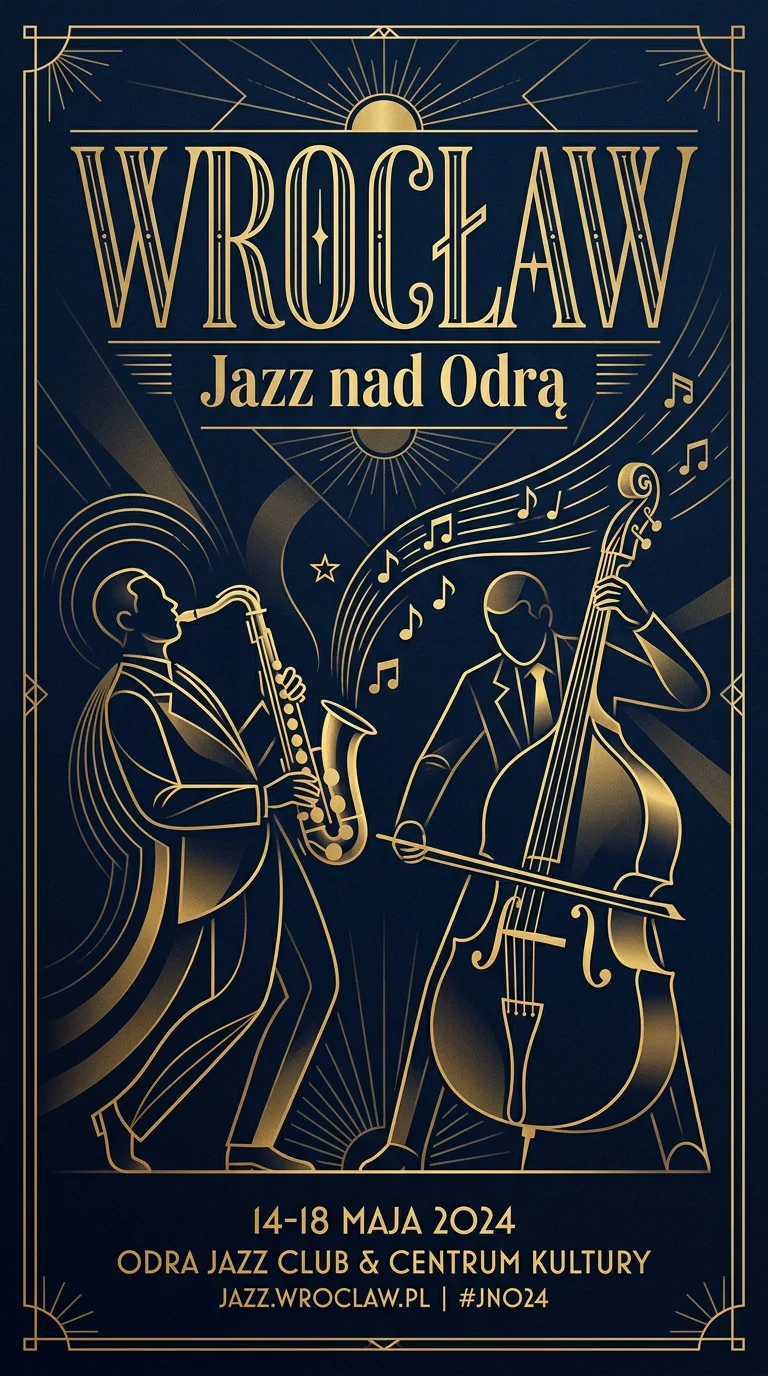
For client work that is a real risk: an invented date or a plausible-looking URL. Adding exactly these lines and nothing else with a full list of the text helps but does not guarantee it. In another test, Z-Image Turbo, asked for an illustration "in the style of" a well-known magazine, drew that magazine's masthead despite "no text". So I read the whole image, not just the spot where the text should be.
How to fix a single word
When the image is good and one word is wrong, I do not regenerate everything. Two options:
- Edit in the model. Send the finished image in
image_urlsto a model with editing (Nano Banana Pro, GPT Image 2.5, FLUX.1 Kontext [pro]) with an instruction that names the error and the fix:
curl "https://jantaris.com/v1/generate?wait=60" \
  -H "Authorization: Bearer $JANTARIS_API_KEY" \
  -H "Content-Type: application/json" \
  -d '{
    "model": "nano-banana-pro",
    "input": {
      "prompt": "Change only the small line of text: replace \"Freshly baked evry day\" with exactly \"Freshly baked every day\". Keep the font, color, size, position and every other element of the image unchanged.",
      "image_urls": ["https://example.com/sign.png"],
      "aspect_ratio": "16:9"
    }
  }'
I have no measurements of my own on how often such a fix works first time. After the edit I read the whole image again, because the model may touch other text along the way.
- Use an image editor. Generate the image with empty space for text (
leave empty space for a headline in the upper third) and set the type in Canva, Photopea or GIMP. That is the safe route for prices, dates, names and anything that will change.
What it costs
Every delivered image is billed; failed generations cost $0. For a graphic with text I plan two or three attempts and one fix:
| Task | Model | Cost |
|---|---|---|
| Poster with text, 3 attempts | GPT Image 2.5 | 3 × $0.0432 per image |
| Same at the highest image quality | Nano Banana Pro | 3 × from $0.0747 per image |
| One-word fix | Nano Banana Pro | 1 × from $0.0747 per image |
| Layout drafts with English text | Z-Image Turbo | 10 × $0.02 per image |
You can try every model in Jantaris Studio without code, with the price shown before you click. General prompting rules for images are in the AI image prompt guide.
FAQ
Which AI image generator is best at text?
In my tests GPT Image 2 and 2.5, Nano Banana Pro and Nano Banana 2 spelled everything correctly, including accented Polish letters. Seedream 5.0 Pro and Qwen-Image-3 were inconsistent, and FLUX.2 [pro] and Z-Image Turbo got accents wrong. Z-Image handled English text fine.
How do I add text to an AI image?
Put the wording in quotes with "exactly", keep it to a few words per element, and describe the typeface and the surface. With several lines, list all the text first and the design after.
Why does AI misspell text in images?
The model draws letters as shapes rather than typing them. Short, common words come out well; long sentences and rarer characters, such as accented letters, break more often.
How do I fix a typo in an AI image?
Send the image to an editing model (for example Nano Banana Pro via image_urls) with "replace X with exactly Y, keep everything else unchanged". Or generate the image without text and set the type in an image editor.
How long can text in an AI image be?
On thumbnails and banners, one to three words per element; on posters, a title, subtitle and a few short lines. Longer copy, such as a price list or a paragraph, is safer to add in an editor.
Can I generate images with text for free?
Jantaris has no free plan or signup credit; you pay from the first image and the minimum top-up is $10. The balance never expires and failed generations cost $0. Vendor apps such as Gemini and ChatGPT offer limited free generation on their own terms.


