











Codex CLI and Jantaris: one key for GPT, Claude and AI media
Connect OpenAI Codex CLI to Jantaris over MCP: one key to generate video and images and ask Claude or Gemini. config.toml for Windows and macOS.
 Piotr Olszewski2026-10-046 minPolski
You connect Codex CLI to Jantaris through an MCP server: set the JANTARIS_API_KEY variable and run codex mcp add jantaris --url https://jantaris.com/mcp --bearer-token-env-var JANTARIS_API_KEY. From then on Codex uses one key to generate images and video (e.g. Nano Banana Pro at from $0.0747 per image), check prices and ask Claude, Gemini or GPT for a second opinion. Codex itself keeps running on its own OpenAI model - I explain why below.
What you get
Codex is OpenAI's coding agent for the terminal. It writes and fixes code well, but it has no built-in video generation, does not know other vendors' prices and will not ask Claude what it thinks. The Jantaris MCP server adds those three things.
| MCP tool | What Codex does with it |
|---|---|
list_models | sees video, image, music and chat models with prices |
get_model | checks allowed parameters before submitting |
estimate_cost | quotes a job before you pay anything |
generate | submits an image, video or song and waits up to 45 seconds |
get_task | fetches the result of a longer job |
get_balance | reports your balance |
chat | sends a question to any chat model in the catalog |
Everything comes out of one prepaid USD balance. No subscription, the balance never expires, and failed generations cost nothing.
What Codex with Jantaris cannot do
Being upfront, because this is the first question I get: you cannot make Claude or any other Jantaris model the main model of Codex.
Codex lets you add a custom provider under [model_providers] in config.toml. According to the current OpenAI docs the only supported wire_api value is "responses", i.e. the Responses API at /v1/responses. Jantaris speaks two chat formats: OpenAI Chat Completions (/v1/chat/completions) and Anthropic Messages (/v1/messages). It has no Responses API, so Codex would get a 404.
What that means in practice:
- Codex stays billed as it is now: your ChatGPT account or OpenAI key.
- In Codex, Jantaris is a set of tools (MCP), not the brain.
- If you want a terminal agent that runs entirely on Jantaris tokens, use Claude Code. See Generate AI video from Claude Code with MCP and the Claude Code docs.
- In editors (Cursor, Cline, Continue, Aider, OpenCode, Zed) you can use Jantaris models through a base URL - full list in Integrations.
Step 1: an API key with a limit
- Sign up, confirm your email and top up (from $10).
- In the dashboard open the API keys tab.
- Name:
codex. Monthly limit: e.g.15(dollars). - Create key and copy
sk-jt-...- it is shown only once.
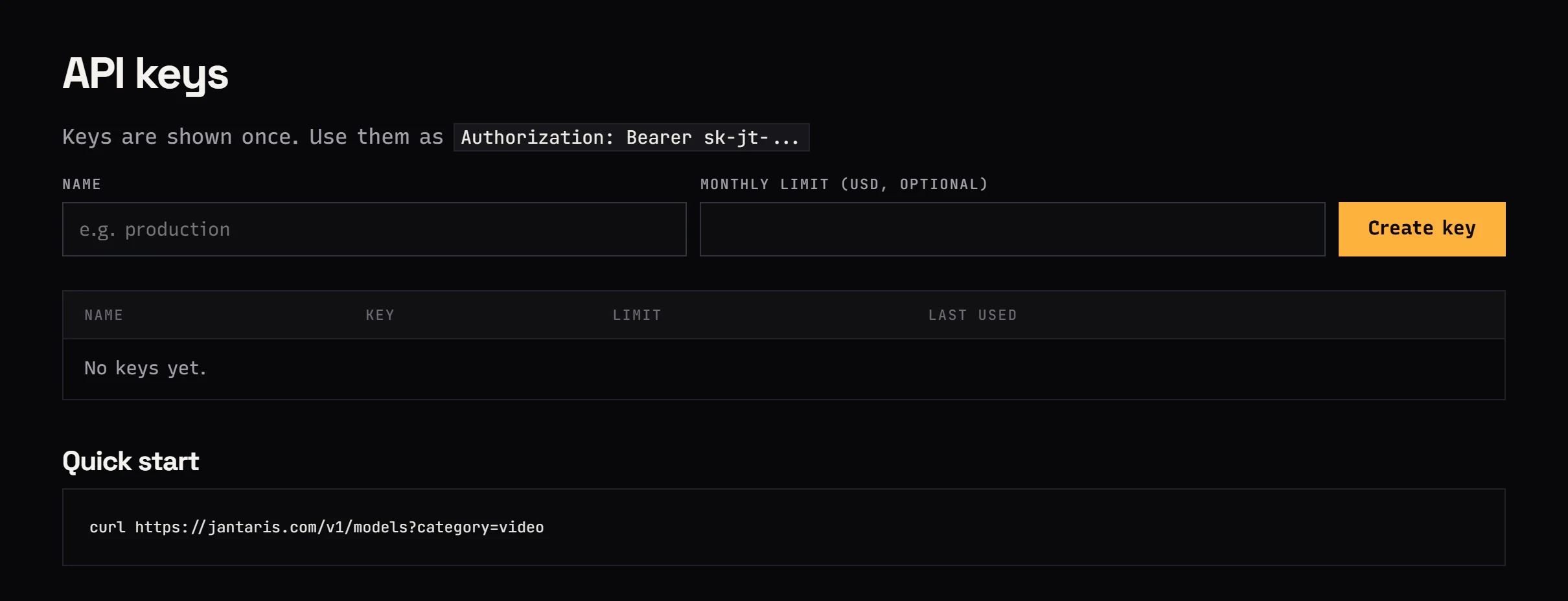
I always recommend the limit. An agent that can generate video may start several clips instead of one after a vague prompt.
Step 2: environment variable
Codex does not keep the key in its config file. config.toml only holds the variable name, and the key lives in your system.
Windows (PowerShell)
[Environment]::SetEnvironmentVariable("JANTARIS_API_KEY", "sk-jt-...", "User")Close PowerShell and open a new one. Check:
echo $env:JANTARIS_API_KEYmacOS and Linux
echo 'export JANTARIS_API_KEY="sk-jt-..."' >> ~/.zshrc   # on Linux usually ~/.bashrc
source ~/.zshrc
echo $JANTARIS_API_KEY
Step 3: the MCP server in Codex
One command, the same on every system:
codex mcp add jantaris --url https://jantaris.com/mcp --bearer-token-env-var JANTARIS_API_KEYCodex adds this block to ~/.codex/config.toml (on Windows C:\Users\<you>\.codex\config.toml):
[mcp_servers.jantaris]
url = "https://jantaris.com/mcp"
bearer_token_env_var = "JANTARIS_API_KEY"
You can paste it by hand instead of running the command. Check:
codex mcp listThen start codex and run a test that costs nothing:
Use the get_balance tool from the jantaris server and tell me my balance.Step 4: your first image from Codex
Start with an image: it usually fits in the 45-second wait and comes back with a link right away.
Generate a 16:9 hero background for the site in this repo: a warm cafe
interior, morning light, no people. Estimate it in Nano Banana Pro and
GPT Image 2.5, pick the cheaper one, show me the cost, and after my OK
generate it and save it as public/img/hero.webp.
Codex calls estimate_cost for both models, shows the amounts and waits. After your OK, generate returns a link and Codex downloads the file into your project.


Prices for comparison: Nano Banana Pro from $0.0747 per image, GPT Image 2.5 $0.0432 per image. Which model fits which job: GPT Image 2.5 vs Nano Banana Pro vs FLUX.2.
Video from Codex
Video has one difference: it takes longer than 45 seconds, so generate returns a task id and Codex fetches the result with get_task.
Make a 5-second 9:16 Seedance 2.5 video at 720p: a cup of coffee on a
windowsill, steam rising in morning light. Cost first. When it is done,
save it as media/coffee.mp4.
Seedance 2.5 costs from $0.261 per second. A failed generation costs nothing - the reserved funds are released in full.
GPT, Claude and Gemini from one key
The chat tool gives you a second opinion without switching windows. Codex writes code with its own model, and you ask it to check the result with another one:
Ask claude-sonnet-5 with the chat tool whether this database migration
is safe with 2M rows. Show its answer next to yours.
More examples:
- "Ask gemini-3.8-flash for 5 names for this function and pick the best."
- "Have deepseek-v4.1-flash translate
locales/en.jsoninto Spanish." - "Give gpt-6-sol this diff and ask for a 3-bullet code review."
The conversation goes through Jantaris, so you pay for the chosen model's tokens from the same balance as your images. Prices per million tokens:
| Model | Price |
|---|---|
| Claude Sonnet 5 | $3.24 / $16.20 per 1M tokens |
| GPT-6 Sol | $2.16 / $10.80 per 1M tokens |
| gemini-3.8-flash | |
| DeepSeek V4.1 Flash | $0.54 / $1.75 per 1M tokens |
More on one API serving several chat models: One API for AI models.
AGENTS.md: Codex knows the API from the start
Codex reads AGENTS.md in your repo on its own. Jantaris serves a ready API description you download with one command:
curl -fsSL https://jantaris.com/agents.md -o AGENTS.mdInvoke-WebRequest -Uri "https://jantaris.com/agents.md" -OutFile "AGENTS.md"It contains endpoints, examples and cost rules. Add your own rules below, e.g. "state the cost before any video and wait for approval" or "save images as .webp in public/img/". This also lets Codex write correct code that calls the Jantaris API directly, without MCP - for example a script that batch-generates thumbnails. Details: AGENTS.md file.
Common errors
| Symptom | Fix |
|---|---|
jantaris does not connect in codex mcp list | JANTARIS_API_KEY is not visible. Open a new terminal or run source ~/.zshrc |
401 | Typo in the key or key revoked in the dashboard |
402 | Balance too low, top up |
403 | The key hit its monthly limit |
404 after adding [model_providers.jantaris] | Codex calls /v1/responses, which Jantaris does not have. Remove that section and stick with MCP |
| Codex does not use the tools | Say it directly: "use the generate tool from the jantaris server" |
Full reference with variants: Codex CLI with Jantaris.
FAQ
Can I use Claude inside Codex through Jantaris?
Not as Codex's main model, because Codex requires the Responses API and Jantaris does not offer it. You can ask Claude from inside Codex with the chat tool of the MCP server. If you want to code in the terminal on Claude, billed by Jantaris, use Claude Code.
Do I need an OpenAI account for this?
Yes, for Codex itself: you sign in with ChatGPT or provide an OpenAI key. Jantaris adds tools and bills only what goes through them.
How much does an image generated from Codex cost?
The same as in Studio or over the API, for Nano Banana Pro from $0.0747 per image. The estimate_cost tool shows the exact amount before you start and charges nothing.
Does my Jantaris key end up in config.toml?
No. config.toml only holds the variable name (bearer_token_env_var); the key lives in an environment variable. The file is safe to back up.
Does it work on Windows?
Yes. Set the variable in PowerShell with SetEnvironmentVariable, and codex mcp add is the same as on macOS and Linux.


