











Image to Video AI - How to Turn a Photo into a Video
Image-to-video AI: first and last frame, reference images, which models support them (Kling 3.0, Seedance, MiniMax H3, Veo 3.1), Studio steps and API code.
 Piotr Olszewski2026-10-0211 minPolski
To turn a photo into a video with AI, you upload the photo as the first frame of a video model such as Kling 3.0, Seedance 2.5 or MiniMax H3, describe only the motion in the prompt, pick a duration and download the MP4 a minute or a few later. On Jantaris you can do it in the browser with Studio or with one POST /v1/generate call. Billing is per second of output (Kling 3.0 is from $0.169 per second), and failed generations cost nothing.
Three ways to animate a photo
| Mode | What you send | What the model does | Use it for |
|---|---|---|---|
| First frame (image-to-video) | one image | the clip starts on your exact frame, the model invents the motion | animating a photo, a packshot, an illustration |
| First and last frame | two images | the model generates the path between them | transformations, transitions, before and after |
| Reference images | 1-30 images, depending on the model | the subject from the images appears in a new scene, the framing is free | the same character across shots, a product in different settings |
One image gives you one shot. A video "from several photos" is either a reference-image generation or several first-frame clips cut together in an editor.
Which models support image-to-video
These limits come from the Jantaris model catalog, which is what the API and Studio actually accept:
| Model | First frame | Last frame | References | Duration | Resolution | Price |
|---|---|---|---|---|---|---|
| Kling 3.0 | yes | yes | up to 2 images | 3-15 s | 720p, 1080p, 4K | from $0.169 per second |
| Seedance 2.5 | yes | yes | up to 30 images, 10 clips, 10 audio | 4-30 s | 480p, 720p, 1080p | from $0.261 per second |
| Seedance 2.0 | yes | yes | up to 9 images | 4-15 s | 480p to 4K | from $0.157 per second |
| MiniMax H3 | yes | yes | up to 9 images, 3 clips, 3 audio | 4-15 s | 768P, 2K | from $0.161 per second |
| Veo 3.1 (Quality) | images as frames (up to 3) | - | - | 8 s | 720p, 1080p, 4K | from $2.53 per video |
| Wan 3.0 | yes | yes | up to 10 images | 2-30 s | 480P to 4K | from $0.0777 per second |
| Grok Imagine Video 1.5 | image-to-video only, one image | - | - | 6-15 s | 480p, 720p | from $0.088 per second |
"From" prices depend on resolution and show the lowest tier. Veo 3.1 is billed per 8-second clip rather than per second.
How I pick: Kling 3.0 when the clip must stay close to the source frame (and optionally needs dialogue), Seedance 2.5 for long takes with sound, MiniMax H3 when I want 2K output. In one of my earlier tests on my Polish blog I animated a fox image made in Grok Imagine with MiniMax H3, and that two-model workflow (still from one model, motion from another) is still how I work. Per-model pricing is covered in Kling 3.0 API pricing, Veo 3.1 API pricing and MiniMax H3 (Hailuo) API.
What makes a good source image
The model starts from exactly what you give it. A weak photo gives a weak clip, and the prompt cannot fix it. Before I spend money on video seconds I check:
- Sharpness and resolution. At least the output resolution. A compressed image from a chat app gets blurrier once it moves.
- Aspect ratio. A portrait image gives a portrait video. Kling ignores
aspect_ratiowhen an image is supplied, and MiniMax H3 rejects it in image-to-video mode. - Room to move. If the camera should push in or orbit, the subject should not touch the frame edge.
- No text. Lettering tends to warp in motion. Add captions in your editor.
- Rights. Animate images you own or are licensed to use, and photos of real people only with their consent. Vendor content filters may also reject a recognisable face. A rejected task is a failed task and costs nothing.
The cheapest way to get a good first frame is an image model. I generated this lighthouse locally with Z-Image Turbo and then used it as the Kling start frame shown below:

An image from Z-Image Turbo costs $0.02 per image, a fraction of one second of video, so I fix composition on stills and only then move to video. More on writing those prompts in the AI image prompt guide.
Step by step in Jantaris Studio
- Open Studio and select the Video tab. No account yet? Sign up and top up from $10.
- Choose a model from the table above, for example Kling 3.0.
- Expand Start frame (URL). Paste an image URL or click Upload file (PNG, JPG or WebP, up to 25 MB).
- In Prompt, describe the motion: what moves and what the camera does.
- Set the duration. For the first try I use the minimum, 3-5 seconds on Kling.
- Tick Generate audio if you want sound from the model. On Kling it is off by default.
- Check the Cost line and click Generate.
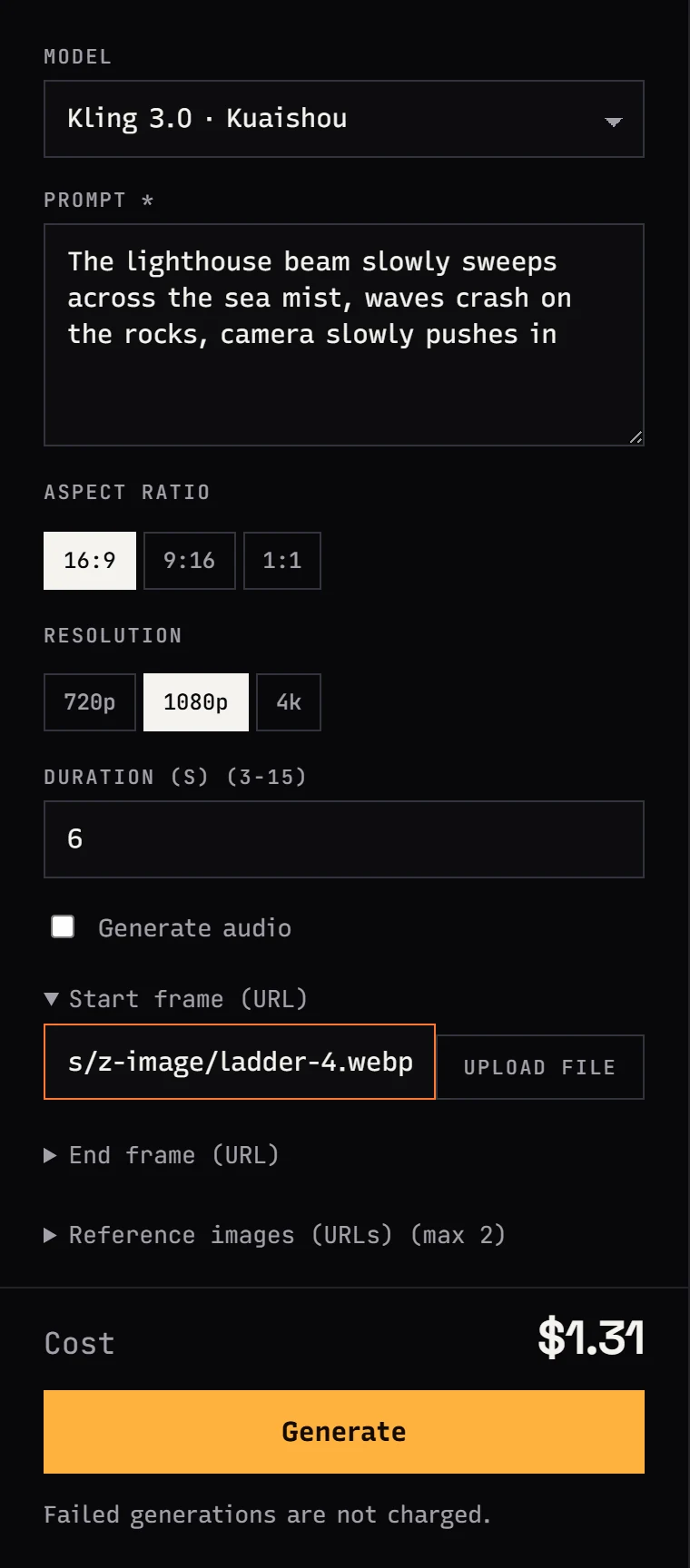
The finished clip lands in your generation history. Download the MP4 right away, because result links expire after a while.
How to write an image-to-video prompt
The most common mistake is describing what is already in the picture. The model can see the lighthouse. Tell it what should change.
The prompt from the screenshot is a good template:
The lighthouse beam slowly sweeps across the sea mist,
waves crash on the rocks, camera slowly pushes in
It has three parts: motion in the scene (the beam, the waves), pace (slowly) and exactly one camera move (push in). The full camera vocabulary is in AI video prompts: camera moves.
A product example. A portrait amber pendant shot that should become a 5-second 9:16 clip:
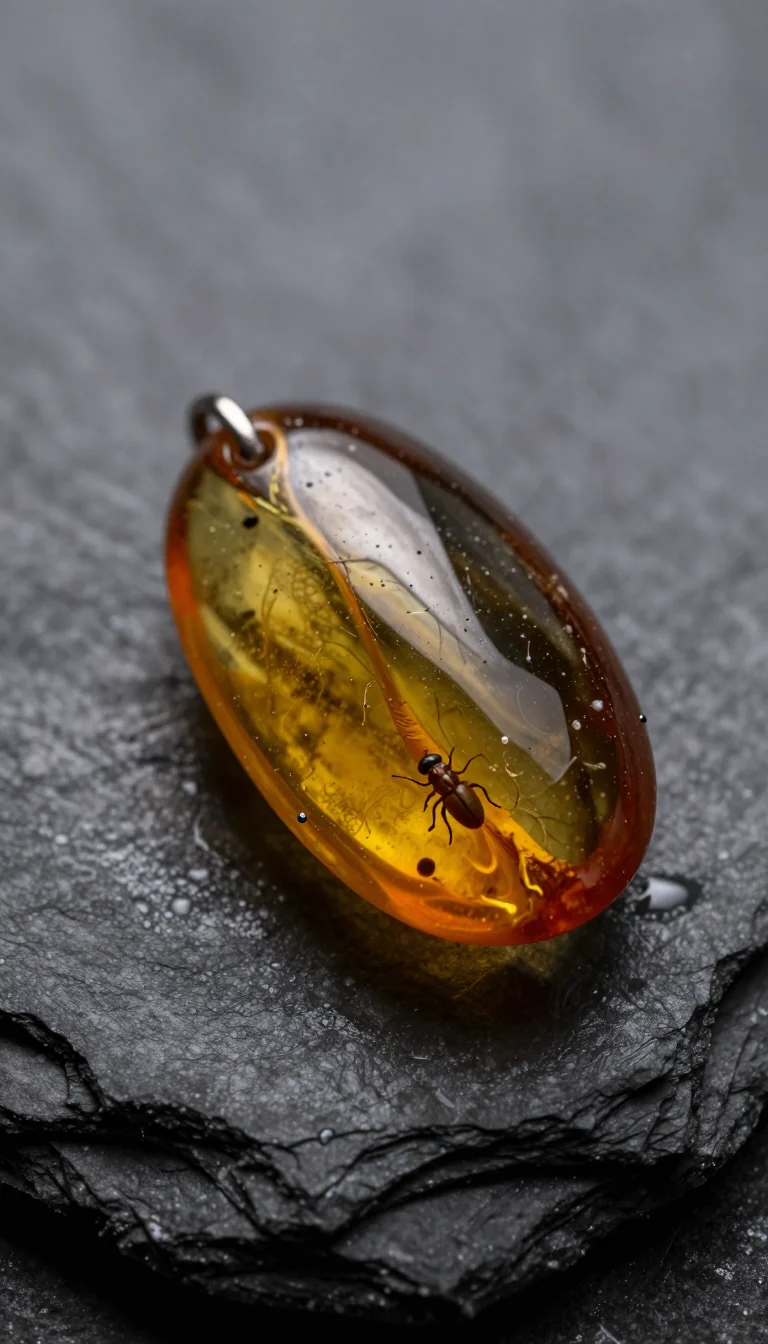
Slow orbit around the amber pendant, the backlight slowly brightens
and the amber starts to glow, tiny water droplets glisten on the slate,
macro, shallow depth of field
What animates well:
- natural motion: wind in hair, steam over a cup, waves, leaves, smoke,
- slow camera moves: push in, pull back, orbit,
- one simple action: a head turn, a smile, lifting a cup.
What tends to break: running, dancing, several people doing different things, and 180-degree turns, because the model has to invent a back side that is not in the photo.
Here is ByteDance's official image-to-video example for Seedance 2.0. The prompt only describes the action:
First and last frame: transitions
With two images the model generates the path from one to the other. It is the easiest way to get controlled transformations: day to night, sketch to finished product, closed box to open box.
In Studio, expand End frame (URL) under the start frame. In the API the field is end_image_url. Kling 3.0, Seedance 2.5 and 2.0, MiniMax H3 and Wan 3.0 all have it.
My rules for frame pairs:
- Same aspect ratio and similar lighting in both images, otherwise the model jumps instead of transitioning.
- Describe the transition, not the images: "the pumpkin cracks open, golden light, white mist".
- Give it time. A transformation in 3 seconds looks like a cut; in 6-8 seconds it looks like an effect.
Alibaba's first-and-last-frame example for Wan 2.7:
Reference images: one character, many shots
A first frame locks the composition. Reference images lock the look of a character or product and leave the framing to the model. That is how I build a series with the same character: generate a portrait and a full-body still, then pass both as Reference images with a different scene prompt for each clip.
How the models differ:
- Seedance 2.5 takes up to 30 images, 10 clips and 10 audio tracks as references, and real people are allowed in them.
- Seedance 2.0 animates 1-2 images in
image_urls; with more, they act as references. - Wan 3.0 takes up to 10 images and you refer to them in the prompt as "Image 1", "Image 2".
- MiniMax H3 keeps identity, motion and voice from references, and the first 5 images do not change the price.
You usually cannot combine frame mode and references in one task. In Seedance 2.0, start and end frames cannot be sent together with reference clips or audio. See Seedance 2.0 vs 2.5 for the differences between the two.
Image to video with the API
Pass the image as a public URL in image_url (first frame) and optionally end_image_url (last frame). Endpoint details are in the generate docs.
curl https://jantaris.com/v1/generate \
  -H "Authorization: Bearer $JANTARIS_API_KEY" \
  -H "Content-Type: application/json" \
  -d '{
    "model": "kling-3.0",
    "input": {
      "prompt": "The lighthouse beam slowly sweeps across the sea mist, waves crash on the rocks, camera slowly pushes in",
      "image_url": "https://example.com/frames/lighthouse.webp",
      "duration": 5,
      "resolution": "1080p"
    }
  }'
You get 202 right away with the task id and estimated_cost. Then poll for the result. In Python:
import os, time, requests

API = "https://jantaris.com/v1"
HEADERS = {"Authorization": f"Bearer {os.environ['JANTARIS_API_KEY']}"}

task = requests.post(
    f"{API}/generate",
    headers=HEADERS,
    json={
        "model": "kling-3.0",
        "input": {
            "prompt": "The lighthouse beam slowly sweeps across the sea mist, "
                      "waves crash on the rocks, camera slowly pushes in",
            "image_url": "https://example.com/frames/lighthouse.webp",
            # "end_image_url": "https://example.com/frames/lighthouse-night.webp",
            "duration": 5,
            "resolution": "1080p",
        },
    },
    timeout=30,
).json()
print(task["id"], task["estimated_cost"])

delay = 2
while True:
    task = requests.get(f"{API}/tasks/{task['id']}", headers=HEADERS, timeout=30).json()
    if task["status"] in ("succeeded", "failed"):
        break
    time.sleep(delay)
    delay = min(delay * 1.5, 15)

if task["status"] == "succeeded":
    video = task["output"][0]
    with open("clip.mp4", "wb") as f:
        f.write(requests.get(video["url"], timeout=120).content)
    print("saved clip.mp4, cost:", task["cost"])
else:
    print("failed, cost 0:", task["error"])
Field differences worth knowing:
- Veo 3.1 has no
image_url. Send images inimage_urls(a list, up to 3). Duration is fixed at 8 s. - MiniMax H3 rejects
aspect_ratioin image-to-video mode, so leave it out. - Kling 3.0 ignores
aspect_ratiowhen an image is supplied and follows the image. - Seedance 2.5 forces
adaptiveaspect ratio with first and last frames.
Every model's schema is at GET /v1/models/{id}. For long jobs, a webhook replaces the polling loop; see also async AI video with webhooks.
How much image-to-video costs
Cost is the per-second rate times the clip length. A first-frame image does not raise the rate on Kling, Seedance or MiniMax H3. Extra charges appear when you send reference video clips (their seconds are billed on top) and on MiniMax H3 from the sixth reference image.
| Model | Rate | 5-second clip |
|---|---|---|
| Kling 3.0 | from $0.169 per second | 5 × the rate for your resolution |
| Seedance 2.5 | from $0.261 per second | 5 × the rate, 480p is cheapest |
| MiniMax H3 | from $0.161 per second | 5 × the rate, 2K costs more than 768P |
| Veo 3.1 (Quality) | from $2.53 per video | always one 8 s clip |
Studio shows the exact amount next to Generate, and the API returns it as estimated_cost before the job runs. You top up a prepaid balance from $10, with no subscription, and the balance does not expire. Rates for every resolution are on the pricing page, and a cross-model comparison is in AI video cost per second.
Common mistakes
- Describing the photo instead of the motion. The prompt should say what changes.
- Too much motion. Three actions and two camera moves in 5 seconds give a jittery clip.
- Wrong source aspect ratio. Crop a landscape photo before making a 9:16 clip.
- Starting at 15 seconds. Get the motion right on the shortest clip first.
FAQ
How do I animate a photo with AI?
Upload the photo as the start frame of a video model (Kling 3.0, Seedance 2.5, MiniMax H3), describe the motion, for example "wind moves her hair, camera slowly pushes in", set 5 seconds and generate. In Jantaris Studio this needs no code.
Is there a free image-to-video AI option on Jantaris?
No. There is no free tier and no starter credits; you pay from the first generation and the minimum top-up is $10. The balance never expires and failed generations cost $0. Some model vendors offer limited free trials in their own apps, so check their current terms if you only need a few clips.
Which image formats can I upload?
The start frame field in Studio accepts PNG, JPG and WebP up to 25 MB. You can also paste the URL of an image that is already online. The API takes a public URL.
Can I animate an old family photo?
Technically yes. Scan it at the highest resolution you can and ask for subtle motion: a blink, a slight smile, a gentle push-in. Large motion makes the model drift away from the original face, so less motion keeps it more faithful.
Can the video have sound?
Yes, on models with audio: Kling 3.0 (tick "Generate audio"), Seedance 2.5 and 2.0, MiniMax H3, Wan 3.0 and Grok Imagine Video 1.5. Describe the sound in the prompt, for example "sound of waves and seagulls".


