











AI Logo Generator - Text Logos, Vector Files and Rights
How to make a logo with an AI image generator: models that spell your brand right, a prompt template, why you get PNG not SVG, cost per draft and rights.
 Piotr Olszewski2026-10-028 minPolski
To make a logo with an AI generator, use an image model that spells your brand name correctly: in my tests GPT Image 2.5 ($0.0432 per image) and Nano Banana Pro (from $0.0747 per image) rendered lettering without mistakes, while Seedream 5.0 Pro had the nicest type but sometimes added accents that were not in the prompt. Whatever model you pick, the output is a raster image (pixels), not an SVG, so the final mark still needs to be vectorized or redrawn. Below: a prompt template, a step-by-step workflow in Jantaris Studio and the API, the cost of a drafting session and what to know about rights.
What an AI logo generator can and cannot do
Image models are not logo design software. They draw a logo the same way they draw a photo: pixel by pixel from a description. Three consequences:
- The file is raster. You get, for example, 1024 x 1024 px from GPT Image 2.5 or up to 4K from Nano Banana Pro. Fine for an avatar or a website header, not enough for a vehicle wrap or a large sign.
- No transparent background. The Jantaris forms have no transparency switch, so I ask for a plain white background and remove it in an editor.
- Text is a drawing. The model draws letters as shapes, so you read every name letter by letter. A short brand name is safer than a name plus a tagline.
Where AI helps is speed of exploration. In fifteen minutes you can look at dozens of symbol, type and color directions, then refine one of them by hand.
Which models spell a brand name correctly
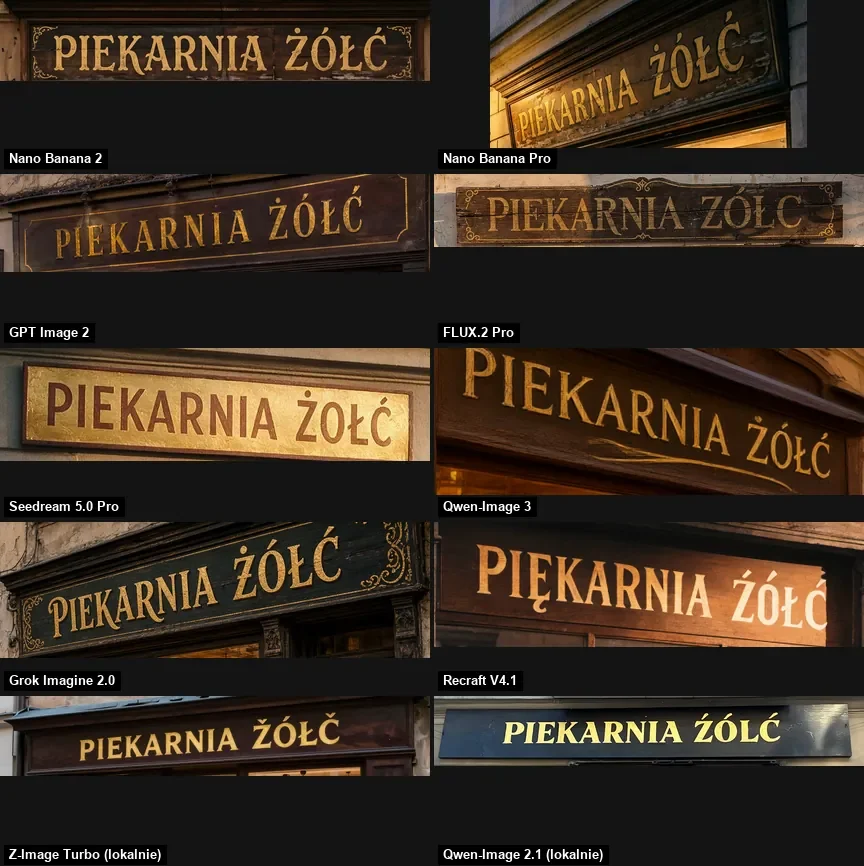
A text logo is a typography test. My reference is a set of lettering tests I ran for my Polish blog: a shop sign, a poster and a neon sign, one attempt per model, with accented letters (Ż, Ó, Ł, Ć) that break weaker models quickly.
| Model | Lettering in my tests | Use for logos | Sizes on Jantaris | Price |
|---|---|---|---|---|
| GPT Image 2.5 | correct in every quality setting | wordmarks, fast variations | 1024x1024, 1536x1024, 1024x1536 | $0.0432 per image |
| Nano Banana Pro | sign and four-line poster correct | polished final, 2K and 4K | 10 aspect ratios, 1K-4K | from $0.0747 per image |
| Seedream 5.0 Pro | once correct, once extra accents | decorative lettering, proofread | 8 aspect ratios, 1K-2K | from $0.0783 per image |
| Z-Image Turbo | English correct, accents wrong | symbol sketches without text | 5 aspect ratios | $0.02 per image |
Ideogram, which shows up in many logo generator lists, is not in the Jantaris catalog. "From" prices are for the lowest resolution tier.
GPT Image 2.5 was the most reliable for the lettering itself. The same sign came out correct in six quality settings:

Seedream 5.0 Pro produced the most attractive letterforms but added accent marks where there were none. That kind of error is easy to miss when you only glance at a logo:
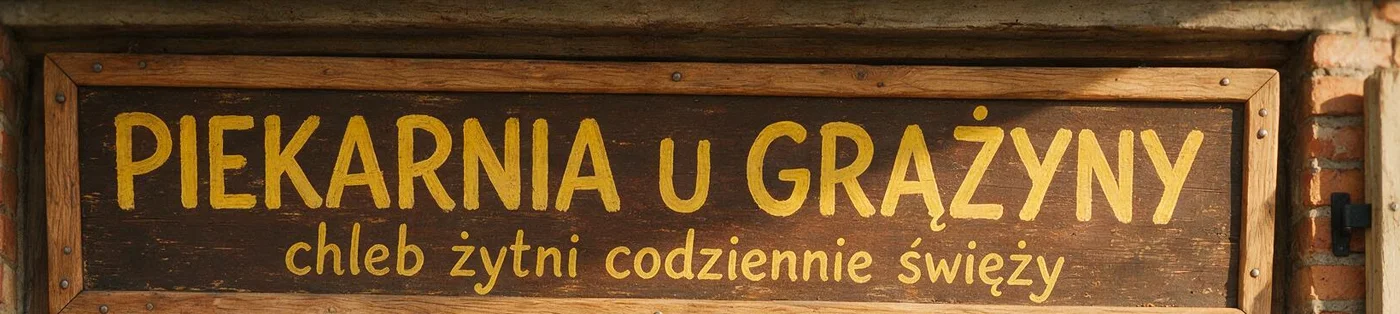
More on text rendering in AI text in images, and a full three-model comparison in GPT Image 2.5 vs Nano Banana Pro vs FLUX.2.
Making an AI logo step by step
- Write down the name. Exactly as it should appear: capitalization, spacing, special characters. Add one sentence about the business.
- Sketch the symbol alone. A dozen or more symbol variations without text in a cheap model like Z-Image. You are looking for a shape, not letters.
- Add the name. Describe the chosen direction and generate it in GPT Image 2.5 with the name in quotes. I usually run 4-6 attempts.
- Polish the final. Send the best version as a reference image to Nano Banana Pro at 2K or 4K and say what must stay unchanged.
- Vectorize. Convert the PNG to vector (see below) and check the mark at 32 px.
A logo prompt with text
I write the prompt like a brief for a designer: type of mark, name in quotes, typeface described in words, colors, background. "Flat", "vector style" and "no mockup" stop the model from drawing a business card on a desk.
Flat vector-style logo for a small coffee roastery, centered on a plain white background, no mockup.
Wordmark text exactly "Northline Roasters" and nothing else.
Symbol: a simple coffee bean split by a single horizon line, single line weight.
Font: bold geometric sans-serif, all caps, charcoal #222222, symbol in amber #E8A33D.
Two colors only, no gradients, no shadows, generous margins.
HEX codes are not a guarantee, but they keep the palette closer between attempts.

In Jantaris Studio
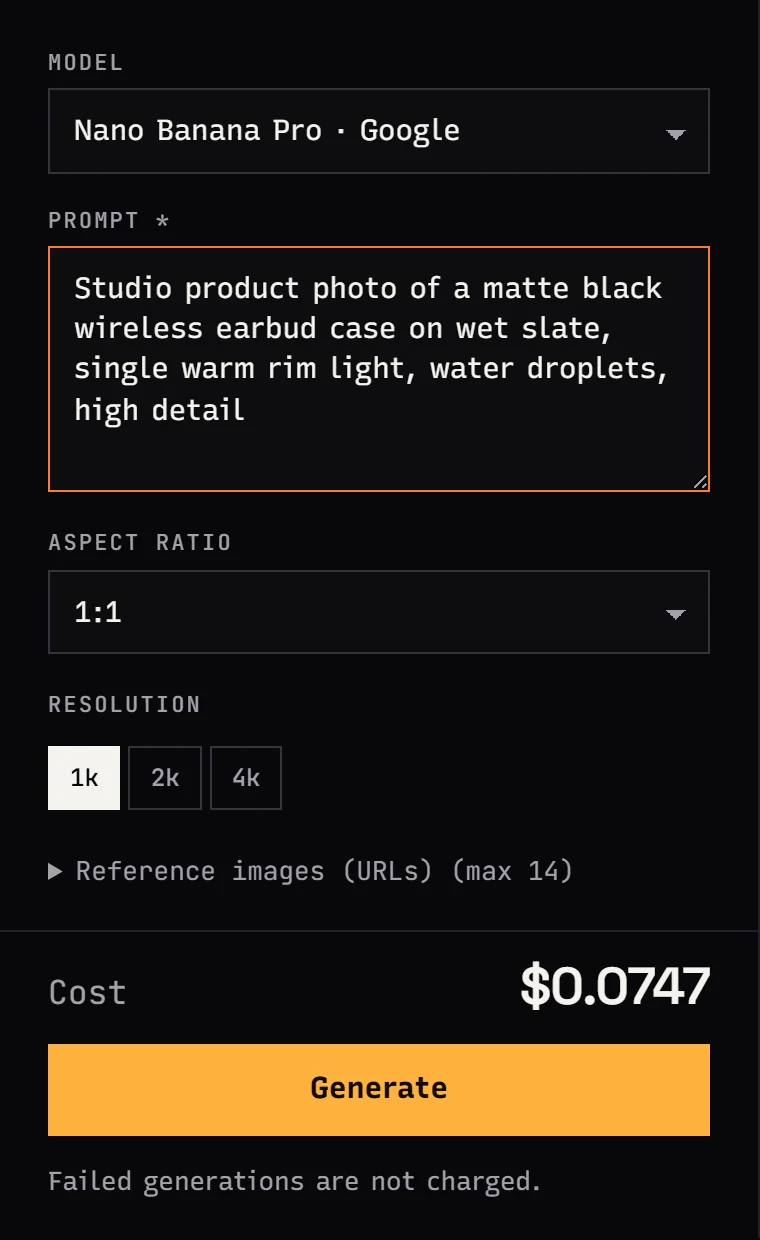
In Jantaris Studio pick the Image tab, a model and 1:1, paste the prompt and see the cost before you click Generate. Nano Banana Pro also has a resolution switch and a reference image field for sending your chosen draft back for edits.
Via the API
The same prompt through the API, waiting for the finished image:
curl "https://jantaris.com/v1/generate?wait=60" \
  -H "Authorization: Bearer $JANTARIS_API_KEY" \
  -H "Content-Type: application/json" \
  -d '{
    "model": "gpt-image-2.5",
    "input": {
      "prompt": "Flat vector-style logo for a small coffee roastery, centered on a plain white background, no mockup. Wordmark text exactly \"Northline Roasters\" and nothing else. Symbol: a coffee bean split by a horizon line. Two colors only, no gradients.",
      "aspect_ratio": "1024x1024",
      "quality": "high"
    }
  }'
In GPT Image 2.5, aspect_ratio takes pixel sizes (1024x1024, 1536x1024, 1024x1536 or auto). For a refinement in Nano Banana Pro, put the chosen file's URL in image_urls and write something like "keep the wordmark and symbol exactly as they are, only change the charcoal to navy #1B2A41". All fields are in the generation docs.
Vector instead of PNG
No image model on Jantaris returns SVG. Three routes:
- Auto-trace. Image Trace in Illustrator or Trace Bitmap in free Inkscape. Works well for a simple two-color mark on white, which is why I prompt for exactly that.
- Redraw. You or a designer redraws the mark with curves. The cleanest result, and real human input into the design, which matters for rights.
- Set the name in a real font. Take only the symbol from AI and set the name in a licensed typeface with a similar feel. No surprises in the letters.
After vectorizing I check the logo at three sizes: 32 px favicon, website header and poster. Details that disappear at 32 px go.
Who owns an AI-generated logo
I am not a lawyer, so this is general information. For an important brand, talk to a trademark attorney.
- Copyright protects works created by humans. The US Copyright Office has said material generated by AI without human authorship cannot be registered, and other countries take similar or still unsettled positions. The more of your own work goes into the final mark (redrawing, edits, composition), the stronger your position.
- Trademark is a separate question. You register a logo with a trademark office (USPTO, EUIPO, UKIPO and others), which looks mainly at distinctiveness and conflicts with earlier marks.
- Similarity to existing marks. Models have seen thousands of logos. Search trademark databases (for example TMview or USPTO search) before you use a mark, and never ask for a logo "in the style of" a known brand.
- Model terms. Use of outputs is governed by each model maker's terms. Jantaris does not use your prompts or outputs to train models.
How much an AI logo costs
Jantaris has no subscription and no free plan. You pay per image from a prepaid balance, minimum top-up $10, and the balance does not expire. A typical session:
| Step | Model | Images | Cost |
|---|---|---|---|
| Symbol sketches, no text | Z-Image | 20 | 20 × $0.02 per image |
| Variations with the name | GPT Image 2.5 | 6 | 6 × $0.0432 per image |
| High-resolution final | Nano Banana Pro | 2 | 2 × from $0.0747 per image |
That is 28 images in total: 20 × $0.02 per image + 6 × $0.0432 per image + 2 × from $0.0747 per image (Nano Banana Pro at 4K costs a bit more). Failed generations cost $0. Full rates are on the pricing page. If the logo will go on product shots, see AI product photos.
FAQ
Is there a free AI logo generator?
Jantaris has no free plan or signup credits; you pay from the first image, with a $10 minimum top-up. Model makers' own apps, such as ChatGPT and Gemini, offer limited free image generation.
Which AI generator is best for logos with text?
In my tests GPT Image 2.5 and Nano Banana Pro rendered lettering without errors. Seedream 5.0 Pro has attractive type but sometimes adds accent marks. I use Z-Image only for symbols without text.
Can an AI logo generator make vector files?
Not on Jantaris. The models return raster images. A simple two-color mark can be traced in Inkscape (Trace Bitmap) or Illustrator (Image Trace); redrawing by hand gives the cleanest result.
How do I get a transparent background?
The Jantaris forms have no transparency option. Generate the logo on a plain white background and remove it in an editor or during vectorization.
Can I trademark a logo made with AI?
You can apply to register it as a trademark; the office judges distinctiveness and conflicts with earlier marks. Copyright in a purely AI-generated image is uncertain, so rework or redraw the mark and search trademark databases first.
How should I write a logo prompt?
Name the type of mark, put the brand name in quotes with "exactly", describe the typeface in words, limit the palette to 2-3 colors and add "plain white background, no mockup".


