











AI Talking Photo - Make a Photo Talk With Lip Sync
Make a photo talk with AI: which image-to-video models generate speech and lip movement, how to write the line, an API example, clip cost and limits.
 Piotr Olszewski2026-10-028 minPolski
To make a photo talk with AI, use an image-to-video model that also generates audio: upload the photo as the first frame, put the spoken line in quotes in the prompt and switch audio on. On Jantaris, Kling 3.0 is the model whose description explicitly includes dialogue with lip movement synced to speech (from $0.169 per second without audio, more with audio on), while Grok Imagine Video 1.5, Vidu Q3 Turbo and MiniMax H3 also turn a photo into a clip with speech, audio included in the rate. Below: a model comparison, a prompt template, a curl example, the cost of a clip and the honest limits.
How an AI talking photo works
Older "talking photo" apps animated only the face in a still image to match a recording you supplied. Current video models do more: they take the photo as the first frame and generate the whole shot together with a soundtrack, meaning the voice, mouth movement, expressions, gestures and room tone. The voice is not yours; the model creates it from your description ("a warm female voice", "a low, calm male voice").
Two practical consequences:
- You write the line in the prompt. The model speaks it. You do not upload a speech file, unless the model accepts audio references (more below).
- The photo sets the frame. Most models take the aspect ratio from the image, so for a 9:16 Reel upload a vertical photo.
Models that can make a photo talk
Data from the Jantaris catalog, meaning what the form and the API actually accept:
| Model | Photo input | Audio and speech | Length | Price |
|---|---|---|---|---|
| Kling 3.0 | first (and last) frame | dialogue with lip sync when generate_audio is on, extra charge | 3-15 s | from $0.169 per second |
| Grok Imagine Video 1.5 | exactly one image | synced audio with dialogue, included | 6-15 s | from $0.088 per second |
| Vidu Q3 Turbo | first frame | dialogue and effects on by default, included | 1-16 s | from $0.081 per second |
| MiniMax H3 | first frame or up to 9 reference images | stereo always, plus up to 3 voice references | 4-15 s | from $0.161 per second |
| Seedance 2.5 | first frame or up to 30 references | speech, effects and music (mono), audio references | 4-30 s | from $0.261 per second |
| Wan 3.0 | first frame or up to 10 references | on by default, audio references | 2-30 s | from $0.0777 per second |
"From" prices are for the lowest resolution. Only Kling's maker explicitly describes lip sync, which is why I start there. The other models generate speech together with the picture, but I have not measured how well they match mouth shapes.
I do not recommend Veo 3.1 (Quality) for this on Jantaris: Google designs Veo with audio, but the Jantaris Veo form has no audio switch. I also skip MiniMax H3 Max, because its catalog description does not mention an audio track.
Kling's own sample shows a multi-character dialogue with native audio:
Step by step
- Pick the photo. Face clearly visible, frontal or slightly turned, mouth closed or slightly open, nothing in front of it (microphone, hand, cup). Same aspect ratio as the clip you want.
- Write the line. One or two short sentences for 5-8 seconds. Longer text gets rushed or cut.
- Describe the voice and the camera. Who speaks, in what tone, what the camera does. A static camera or slow push-in keeps the face most stable.
- Test cheap first. I run the first attempt at the lowest resolution and only render the keeper at full quality.
My prompt template:
The woman in the photo looks into the camera and says in a warm, calm voice:
"Hi, I'm Anna. Today I'll show you how to repot a cactus without gloves."
Natural head movement and blinking, subtle hand gesture at the end.
Static camera, soft daylight, quiet room tone, no music, no subtitles.
"No music" and "no subtitles" matter. In my video tests some models added music I never asked for.
In Jantaris Studio
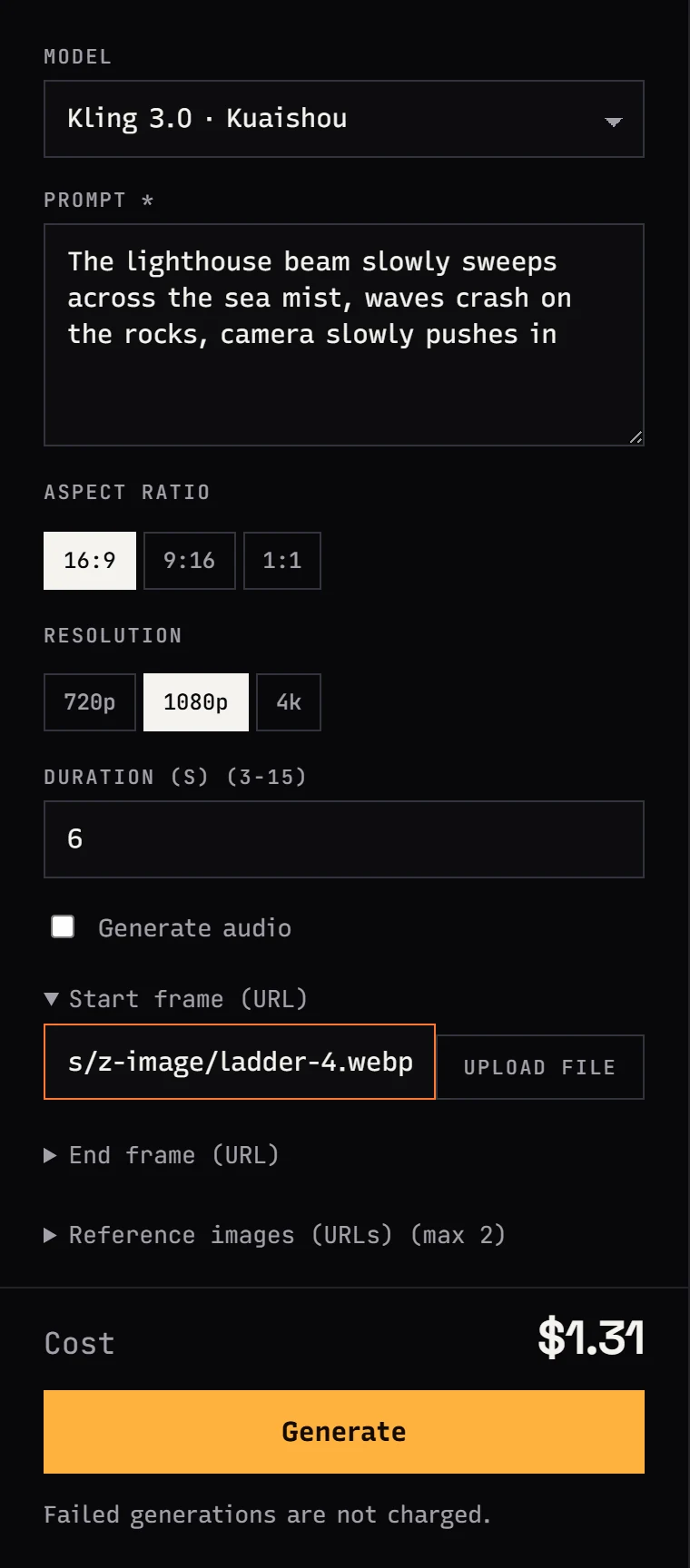
In Jantaris Studio open the Video tab and pick Kling 3.0. Upload the photo in the start frame field (file or URL), tick the audio checkbox, set duration and resolution. The cost appears under the form before you click Generate.
Via the API
The same job through the API. image_url is the first frame, generate_audio: true turns on dialogue:
curl https://jantaris.com/v1/generate \
  -H "Authorization: Bearer $JANTARIS_API_KEY" \
  -H "Content-Type: application/json" \
  -d '{
    "model": "kling-3.0",
    "input": {
      "prompt": "The woman in the photo looks into the camera and says in a warm, calm voice: \"Hi, I am Anna. Today I will show you how to repot a cactus.\" Natural blinking, static camera, quiet room tone, no music, no subtitles.",
      "image_url": "https://your-site.com/files/anna.jpg",
      "duration": 6,
      "resolution": "720p",
      "generate_audio": true
    }
  }'
The response returns an id and estimated_cost; you fetch the finished file with GET /v1/tasks/{id}. If you want a specific voice, MiniMax H3 accepts recordings in audio_urls, but only together with a reference image or clip, for example the character photo in image_urls. The first five reference images and all audio references are free. There is a full request in MiniMax H3 and Hailuo API.
What a talking photo costs
Cost is clip seconds times the rate. Examples for one clip at the lowest resolution, with audio:
| Model | Clip | Cost |
|---|---|---|
| Vidu Q3 Turbo, audio included | 8 s | 8 × from $0.081 per second |
| Grok Imagine Video 1.5, 6 s minimum | 6 s | 6 × from $0.088 per second |
| MiniMax H3 at 768P, stereo included | 6 s | 6 × from $0.161 per second |
| Seedance 2.5 at 480p | 5 s | 5 × from $0.261 per second |
| Kling 3.0 at 720p with audio | 6 s | 6 × the audio rate (without audio from $0.169 per second, with audio about 1.4x that) |
The Kling figure is approximate because the audio surcharge depends on resolution. Studio shows the exact amount under the form, and the API returns it in estimated_cost. Plan 2-3 attempts per good take. Failed generations cost $0, and the prepaid balance starts at $10 with no expiry. You can price any combination in the AI cost calculator.
What about other languages?
English is the safe choice. Kling 3.0's official speech languages are Chinese, English, Japanese, Korean and Spanish. When I tested a hard Polish sentence on 28 September 2026 (through other API providers, not Jantaris), Kling 3.0 Pro got 10 of 12 words wrong, even though the picture and mouth movement looked right:

In the same test MiniMax H3 (one wrong word out of 12) and Grok Imagine Video 1.5 (no errors) handled Polish best. The full table and workarounds are in AI video with non-English speech.
Limits and consent
- Consent. Animate only your own photos or photos of people who agreed. A video in which someone "says" words they never said can violate personality and publicity rights, and impersonation can be a crime.
- Labeling. When you publish, say the video was made with AI. Social platforms have their own disclosure rules.
- Long monologues. 15 seconds is the ceiling for most of these models (Seedance 2.5 and Wan 3.0 go to 30 s). Build longer speeches from several clips.
- Teeth and profiles. Most artifacts show up with wide smiles, profile views and fast head turns. A static camera and a frontal face help.
The general image-to-video workflow, without speech, is in my image-to-video guide. A PixVerse vendor sample with dialogue in the scene (PixVerse V6 has optional audio too):
FAQ
How do I make a photo talk with AI?
Upload the photo as the first frame in a video model with audio (for example Kling 3.0 with audio on), write the line in quotes in the prompt and describe the voice. The model generates a clip with speech, expressions and mouth movement.
Which AI model does lip sync from a photo?
On Jantaris, Kling 3.0 is the model whose description explicitly covers lip movement synced to speech. Grok Imagine Video 1.5, Vidu Q3, MiniMax H3, Seedance 2.5 and Wan 3.0 also generate speech together with the picture.
Can I use my own voice?
The model creates the voice from your description. MiniMax H3 accepts up to 3 recordings as a voice reference, together with a reference image. You can also lay your own recording over a silent clip in an editor.
Can a talking photo speak languages other than English?
Results vary a lot. In my Polish test, Kling 3.0 spoke with foreign phonetics, while MiniMax H3 and Grok Imagine Video 1.5 got a hard sentence almost or fully right. Always test a non-English line on one short clip first.
How much does an AI talking photo cost?
Clip seconds times the model's rate. For example, 8 seconds in Vidu Q3 Turbo is 8 × from $0.081 per second, audio included. Failed generations cost $0.
Is there a free AI talking photo tool?
Jantaris has no free plan or signup credits; the minimum top-up is $10. Some model makers' own apps offer limited free trials.


