











Consistent Character in AI Video and Images - Working Method
How to keep the same character across AI images and video: a master portrait, reference images, first-frame video, fixed description and seed.
 Piotr Olszewski2026-10-029 minPolski
A consistent character comes from an image, not from a description. Generate one master portrait, then pass it to the model as a reference in image_urls (for images) or as the first frame in image_url (for video). A prompt alone, however detailed, gets you the character's brother at best: in my ten-model test, props stayed put everywhere and faces did not. Below: why faces drift, a four-step method, how many references each model on Jantaris accepts, and what no model guarantees.
Why the face keeps changing
A model has no memory of your previous image. Each generation starts from random noise (the seed), and the prompt only narrows down what comes out of it. Anything the prompt leaves open gets decided again.
Here is my local Z-Image Turbo test: same prompt, three seeds.
portrait of a fisherman in a yellow raincoat on a pier, overcast light, 85mm lens, realistic skin texture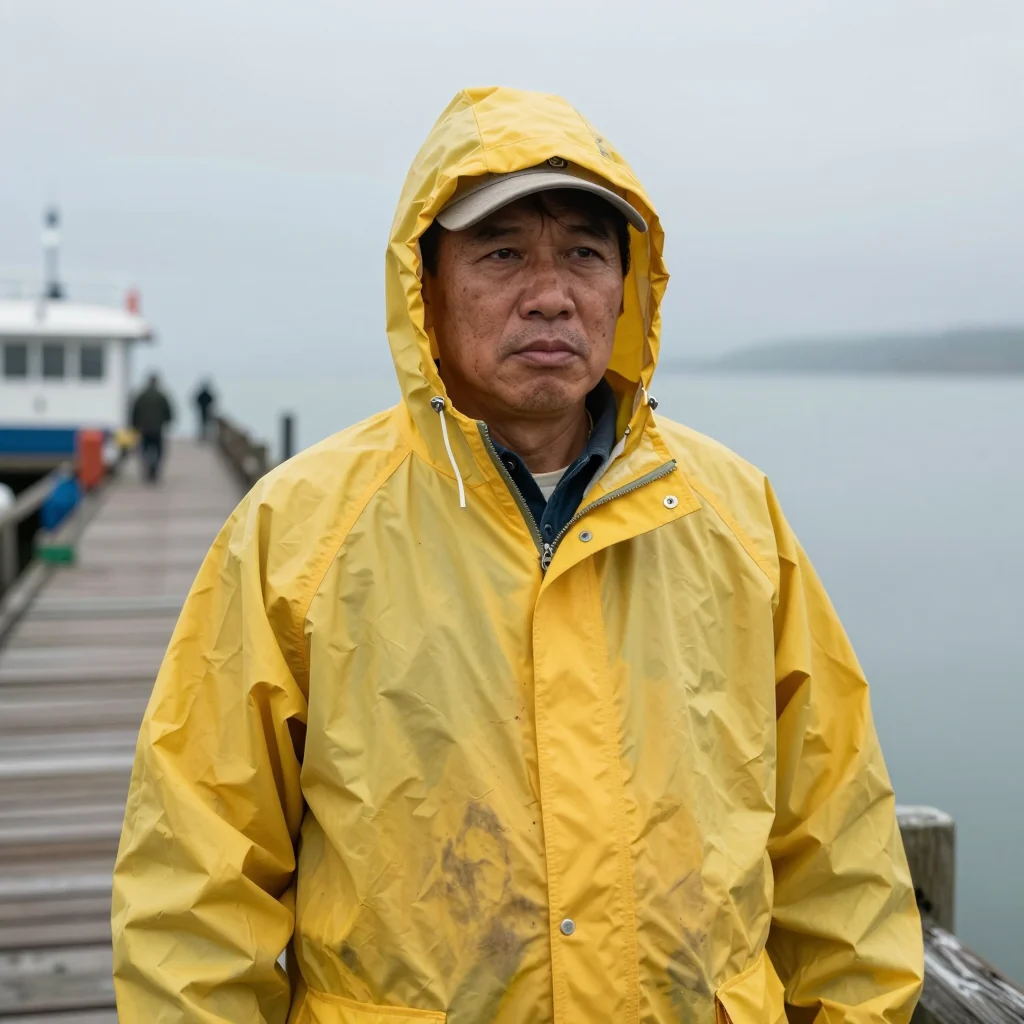

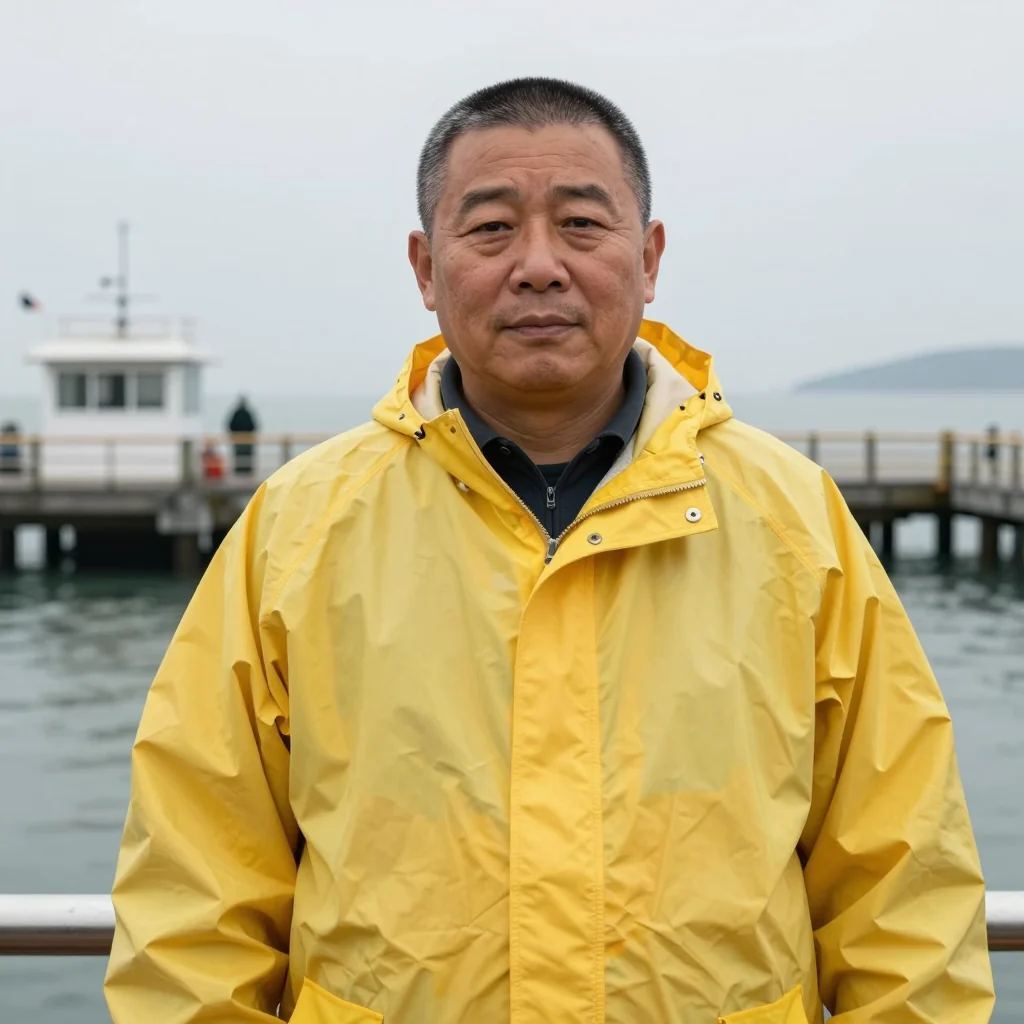
The description was met three times: yellow raincoat, pier, overcast light. But these are three different men, with different face shapes, ages and hair. The only shared trait is a "type" the model picked on its own, because the prompt said nothing about appearance. Every generator works like this: the text sets the category, the face is rolled.
Test: 10 models, one character, 4 scenes
In June 2026 I gave ten models the same character for my blog promptowy.com: Marek, 35, short dark beard, round glasses, messy brown hair, mustard sweater. Four scenes (café, bicycle, office, rain at night), the same description and the same seed, no reference image. Full boards (in Polish): Can AI keep the same face?
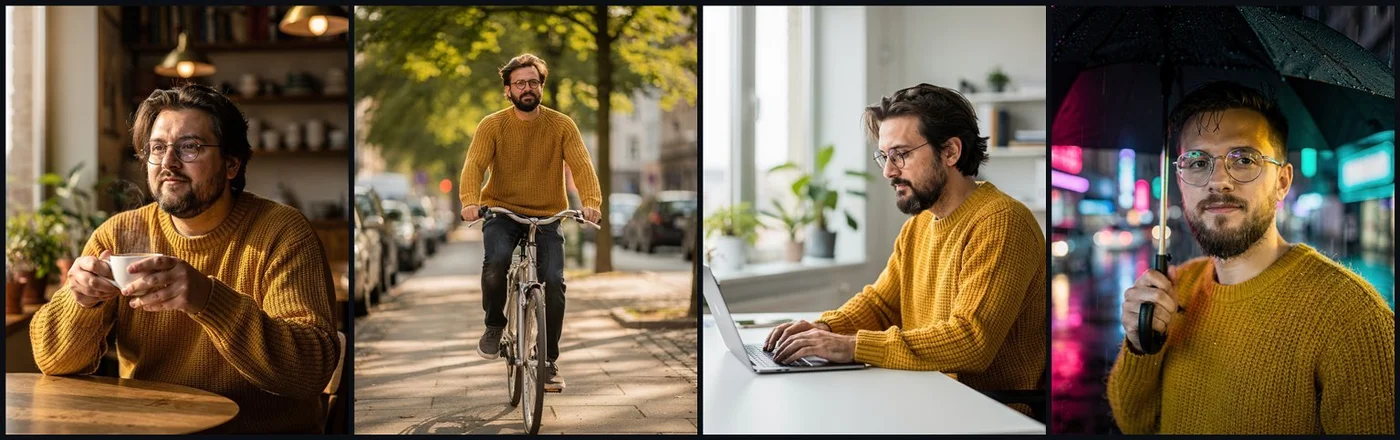
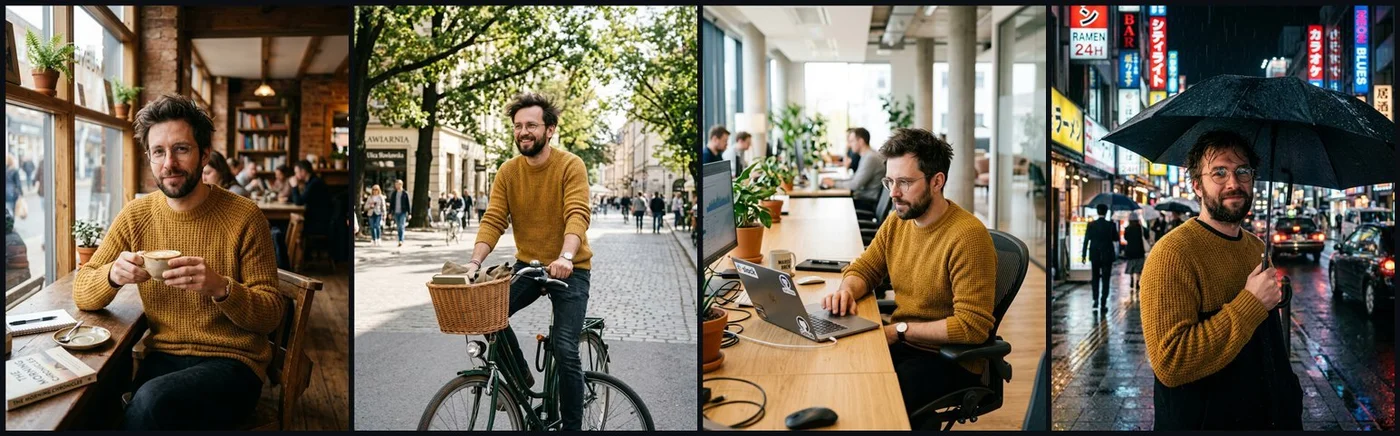
What came out of it:
- Every model kept the props. Glasses, beard, sweater and hair survived all four scenes. Consistency of the character type is solved.
- Faces are another matter. Seedream 4.5 held the face best, followed by Photon and FLUX.2 [pro]. GPT Image 2 drifted slightly in the rain scene.
- Nano Banana 2 came last, despite being marketed on consistency. Café, bike and rain looked like three people sharing a sweater.
Takeaway: a description gives you someone similar, not the same person. That takes a reference.
The method in four steps
1. A master portrait
First I make one image that becomes the source of truth for the character, ideally a character sheet: front close-up, profile and full body on a neutral background, in even light.
Character sheet of the same man on a plain light grey background, even studio light:
front close-up, left profile close-up, full body standing. 35 years old,
short dark beard, round thin metal glasses, messy brown hair, mustard knitted sweater,
dark jeans, white sneakers. Realistic photo, no text.
I use a model with strong faces for this, such as Nano Banana Pro (from $0.0747 per image), generate a few versions and lock one in.
2. A fixed description
The same block of text goes into every prompt, word for word. Not "bearded guy with glasses" in one prompt and "man with stubble" in the next; every changed word is a new instruction to the model. I give the character a name and describe only what must not change: age, face, hair, outfit. The variable part (scene, action, light) is written separately.
3. Scenes with a reference (images)
Upload the portrait to image_urls (in Studio: Reference images (URLs), Upload file button) and tell the model who the person is:
curl "https://jantaris.com/v1/generate?wait=60" \
  -H "Authorization: Bearer $JANTARIS_API_KEY" \
  -H "Content-Type: application/json" \
  -d '{
    "model": "nano-banana-pro",
    "input": {
      "prompt": "The man from the reference image, same face, beard, glasses, hair and mustard sweater. He rides a bicycle down a tree-lined street in autumn, late afternoon sun, 50mm lens, realistic photo.",
      "image_urls": ["https://example.com/marek-sheet.png"],
      "aspect_ratio": "16:9",
      "resolution": "1k"
    }
  }'
Set the aspect ratio explicitly: without it, Nano Banana Pro inherits the format of the first reference. Compare every scene with the portrait: eyes, nose, jawline.
4. Video: first frame or references
Two routes for video:
- First frame (
image_url). A scene from step 3 becomes the opening frame and the prompt describes only motion. The safest route, because the first second is exactly your image. More in image to video with AI. - Reference images (
image_urls). The model builds a new shot from scratch but takes the character's look from your images. More freedom in framing, less certainty.
I tried the second route in September 2026 on Kling 3.0 Omni (through another API; that Kling mode is not on Jantaris). The reference was a frame of a woman at a kitchen table from one of my earlier clips, and the prompt had her stand up, walk to the window and say one line. Face, hair and sweater matched the reference and the model performed the whole action. The catch: she said the line with her back to the camera, so lip sync could not be judged. Write-up (Polish): Kling 4.0 Omni Reference.
Reference limits by model
From the Jantaris catalog. Use an image model for the portrait and scenes, a video model for motion.
| Model | Type | Reference images | First frame | Seed |
|---|---|---|---|---|
| GPT Image 2.5 | image | up to 16 | - | no |
| Nano Banana Pro | image | up to 14 | - | no |
| Nano Banana 2 | image | up to 14 (up to 4 character refs recommended) | - | no |
| Seedream 5.0 Pro | image | up to 10 | - | no |
| FLUX.2 [pro] | image | up to 8 | - | no |
| FLUX.1 Kontext [pro] | image | up to 4 | - | yes |
| Seedance 2.5 | video | up to 30 | yes | yes |
| Wan 3.0 | video | up to 10 | yes | yes |
| MiniMax H3 | video | up to 9 | yes | no |
| HappyHorse 1.1 | video | up to 9 | yes | no |
| PixVerse V6 | video | up to 7 | yes | yes |
| Kling 3.0 | video | - | yes (plus last frame) | no |
Notes from the model specs:
- HappyHorse 1.1 lets you address references in the prompt as
[Image 1],[Image 2]. Wan 3.0 uses "Image 1", "Video 1", and ByteDance's own Seedance 2.5 example says "@Video 1". Labels help when there are several characters. - MiniMax H3 bills reference images six to nine extra.
- Seedance 2.5 accepts references showing real people, per its spec. Some other models filter real faces out. A rejected task on Jantaris costs $0.
Seedance 2.5 can also extend a finished clip while keeping the characters, another way to stay consistent over a longer scene:
Motion from your own footage: Motion Control
When the character has to perform a specific movement (a dance, a gesture, a walk), Kling 3.0 Motion Control takes a character image (image_url) and your motion clip (video_url). Appearance comes from the image, motion from the video. It costs $0.249 per second, counted on the length of the source clip.
What the seed does and does not do
The same seed plus the same prompt in the same model gives the same image. Change the scene and the face moves anyway, which the Marek test showed (one seed for all scenes). I use seeds for:
- one-word fixes to a frame that already works,
- comparisons, such as the same seed with and without a reference,
- repeatability in a series, when the model has the field (see the table).
A seed does not hold a face. A reference does.
What no model guarantees
Even with references, expect that:
- profiles and distant shots drift more than frontal close-ups,
- small clothing details (logos, knit patterns, jewelry) change between shots,
- two characters in one frame can blend, with traits jumping from one to the other,
- long clips (20-30 s) have more time to drift than 5-second ones,
- expression and apparent age shift under strong emotions in the prompt.
So I budget two attempts per shot.
What it costs
Example: one character across six 5-second shots for a short video.
| Step | Model | Count | Cost |
|---|---|---|---|
| Master portrait | Nano Banana Pro | 4 versions | 4 × from $0.0747 per image |
| Scenes with reference | Nano Banana Pro | 6 scenes × 2 | 12 × from $0.0747 per image |
| First-frame video | Seedance 2.5 | 6 × 5 s × 2 tries = 60 s | 60 × from $0.261 per second |
"From" in the Seedance price is the lowest resolution; higher ones cost more (rates on the model page). You see each task's cost before you run it, and the API returns it as estimated_cost. Failed generations cost $0. For per-second math across models see AI video cost per second, and for characters in a music video see AI music video.
FAQ
How do I keep the same character across AI images?
Generate one master portrait and pass it as a reference image (image_urls) in every new scene, together with the same character description. Description and seed alone will not hold the face.
Which model keeps faces most consistent?
Without references, Seedream 4.5, Photon and FLUX.2 [pro] did best in my test and Nano Banana 2 did worst. With references the gap shrinks, so choose by image quality and reference limit.
How many reference images can I use?
It depends on the model: GPT Image 2.5 up to 16, Nano Banana Pro up to 14, FLUX.2 [pro] up to 8; for video, Seedance 2.5 up to 30 and Wan 3.0 up to 10. See the table above.
Is a fixed seed enough for a consistent character?
No. A seed reproduces an image only with the same prompt. Change the scene and the face shifts.
Can I use a photo of a real person?
Technically yes in models that accept it, but only with that person's consent. Some models filter real faces; a rejected task on Jantaris costs nothing.
Is there a free way to do this?
Jantaris has no free plan or signup credit; you pay from the first generation and the minimum top-up is $10. The balance never expires, so you can start with a handful of images in Jantaris Studio.


