











AI Motion Control - Dance Video From a Photo With Kling
AI motion control with Kling 3.0 and 2.6: copy a dance or gesture from your clip onto a character in a photo. 3-10 s source, per-second price, Studio, API.
 Piotr Olszewski2026-10-029 minPolski
AI motion control takes the movement from a video you record and applies it to a character from a photo: film yourself doing a dance or a gesture, add an image of the character, and the model renders that character doing the same moves. Jantaris has two Kuaishou models for it, Kling 3.0 Motion Control ($0.249 per second) and the budget Kling 2.6 Motion Control ($0.138 per second), both billed on the length of the source clip. An 8-second dance on 3.0 is 8 × $0.249 per second. Below: how to film the motion, which photo to use, and how to run it in Studio and over the API.
How motion control works
Each job needs three inputs:
- a character image (
image_url), which sets the look: face, outfit, style, even for an illustration or a mascot, - a motion clip (
video_url), which sets the movement: steps, gestures, facial acting; MP4 or MOV up to 100 MB, 3 to 10 seconds long, - a prompt, required but secondary. Use it for the scene, lighting and mood, not the motion.
On Jantaris the subject's facing follows the image, which is why the source clip runs 3-10 seconds. Kuaishou also offers a video-facing mode that accepts clips up to 30 seconds, but Jantaris does not expose it yet. The source clip's audio is kept in the output, and the switch to drop it is not available yet either.
Pick the quality in quality: std (default) or pro. pro has a higher per-second rate, which Studio shows as soon as you switch.
Kling 3.0 or 2.6 Motion Control
| Kling 3.0 Motion Control | Kling 2.6 Motion Control | |
|---|---|---|
| Released | March 2026 | December 2025 |
| Subject consistency | higher | lower |
| Motion clip | 3-10 s, MP4/MOV up to 100 MB | 3-10 s, MP4/MOV up to 100 MB |
| Quality | std or pro | std or pro |
| Price (std) | $0.249 per second | $0.138 per second |
Version 3.0 holds the character's face and outfit better through movement, so it is my pick for shots that get published. Version 2.6 costs less per second, which makes it the place to test choreography, framing and the character image before paying for the final render. For a high-volume series of trend clips with a simple character, 2.6 may be all you need.
Here is how Kuaishou presents 3.0. These vendor clips were made in the Kling app with its element binding feature, which Jantaris does not expose, so read them as a sense of the model rather than a Jantaris result:
And 2.6, including an illustrated character and a dance with hand gestures:
Filming motion the model can read
The source clip decides most of the result. Rules that follow from how the model works:
- Full body in frame, head to feet, for the whole clip. A hand or foot leaving the frame is missing motion data.
- Tripod, not handheld. Only the person moves. Camera movement gets confused with body movement.
- Plain background and good light, nobody else in the shot.
- No cuts or transitions. One continuous take.
- Trim to the move itself. You pay per second of the source and the length has to fit 3-10 s. Split a trend longer than 10 seconds into two clips.
- Match the image's aspect ratio. For TikTok, film vertically and use a vertical character image.
Choosing the character image
- Full figure in a similar pose to the first frame of your clip. If you start facing the camera with arms down, the image should too.
- Similar body proportions. A character built very differently from the person in the clip tends to get odd limb motion.
- Clear face and outfit, nothing covering them. The model cannot invent detail it cannot see.
- Illustrations, mascots and game characters work too, because the look comes from the image, not the video.
No character image yet? Generate one with an image model first. Keeping the same character across many clips is covered in consistent characters in AI video.
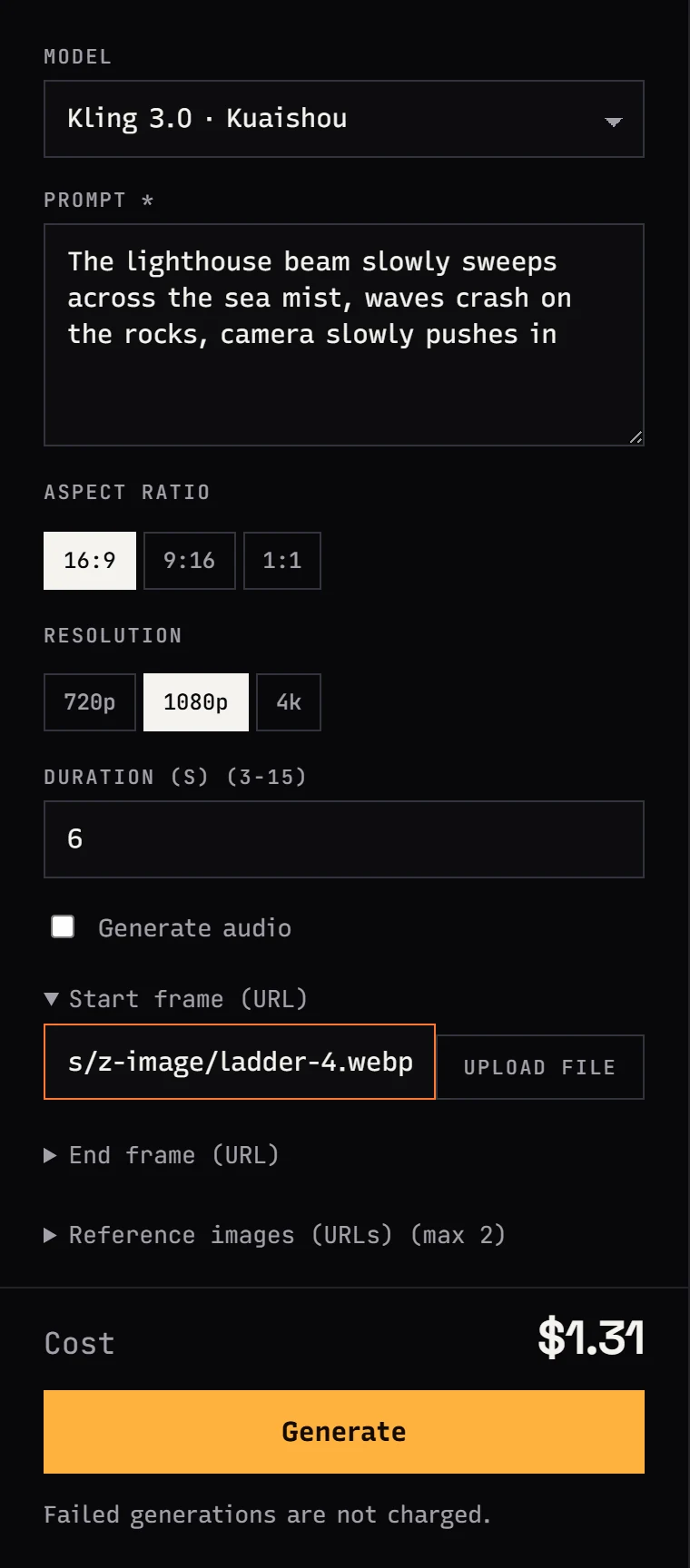
Step by step in Jantaris Studio
- Sign up and add funds (from $10).
- In Studio, stay on the Video tab and pick Kling 3.0 Motion Control or Kling 2.6 Motion Control in Model.
- In Prompt, describe the scene, for example "bright studio, soft light, plain backdrop, music video mood".
- Choose Quality:
stdfor tests,profor the final. - Expand Start frame (URL) and click Upload file. This is the character image.
- In Source video (URL), upload the motion clip. Studio accepts MP4 and MOV up to 25 MB; files up to 100 MB go in as a public link.
- Press Generate and download the clip from the gallery.
The Cost line will read higher than your final charge. Jantaris only knows the clip length after fetching it, so before the job it holds a reserve of 120 seconds, on 3.0 std that is 120 × $0.249 per second. When the job is done it charges for the actual source seconds (rounded up) and releases the rest at once. The full reserve has to fit in your available balance, so with a small top-up start on 2.6.
Motion control over the API
Everything goes into input: prompt, image_url, video_url and optionally quality.
curl https://jantaris.com/v1/generate \
  -H "Authorization: Bearer $JANTARIS_API_KEY" \
  -H "Content-Type: application/json" \
  -d '{
    "model": "kling-3.0-motion-control",
    "input": {
      "prompt": "Bright studio, soft light, plain backdrop, music video mood",
      "image_url": "https://your-server.com/characters/mascot.png",
      "video_url": "https://your-server.com/motion/dance-8s.mp4",
      "quality": "std"
    }
  }'
The 202 response carries the id and estimated_cost (the 120-second hold). To run one choreography across several characters, a short Python loop does it:
import os, time, requests

API = "https://jantaris.com/v1"
HEADERS = {"Authorization": f"Bearer {os.environ['JANTARIS_API_KEY']}"}
MOTION = "https://your-server.com/motion/dance-8s.mp4"
characters = {
    "mascot": "https://your-server.com/characters/mascot.png",
    "robot": "https://your-server.com/characters/robot.png",
}

for name, image in characters.items():
    task = requests.post(f"{API}/generate", headers=HEADERS, timeout=30, json={
        "model": "kling-2.6-motion-control",
        "input": {"prompt": "Plain light studio, soft shadows", "image_url": image,
                  "video_url": MOTION, "quality": "std"},
    }).json()
    while task["status"] not in ("succeeded", "failed"):
        time.sleep(10)
        task = requests.get(f"{API}/tasks/{task['id']}", headers=HEADERS, timeout=30).json()
    if task["status"] == "succeeded":
        with open(f"{name}.mp4", "wb") as f:
            f.write(requests.get(task["output"][0]["url"], timeout=300).content)
    print(name, task["status"], task.get("cost"))
On succeeded, output holds the clip (type: "video") and cost the charge for the real source seconds. For bigger batches, use webhook_url instead of polling (webhooks). A clip outside the 3-10 s window is rejected, and a failed task costs $0.
What motion control costs
You pay for each started second of the source clip, not the output:
| Job | Seconds | Cost |
|---|---|---|
| 8 s dance, 3.0 std | 8 | 8 × $0.249 per second |
| same dance, test on 2.6 std | 8 | 8 × $0.138 per second |
| 5 tests of 6 s on 2.6, final 6 s on 3.0 | 30 + 6 | 30 × $0.138 per second + 6 × $0.249 per second |
| mascot trend: 10 clips of 10 s on 2.6 | 100 | 100 × $0.138 per second |
Prices in the table are for std; pro costs more. The balance is prepaid in USD with no subscription and no expiry. Need the finished clip in 4K? See the AI video upscaler guide. All Kling models and rates are in Kling 3.0 API pricing.
Limits and rights
- 3-10 s source clips. The longer video-facing mode (up to 30 s) is not on Jantaris yet.
- Source audio stays. If trending music played in the background, it ends up in the clip. Add music in the edit from the platform's own library instead.
- No multi-image character binding. The Kling app's element features are not exposed; the character comes from one image.
- Likeness. Use a real person's photo only with their consent, and leave celebrity faces out entirely. The same goes for the person in the motion clip.
- Hands and faces in fast motion can smear. Scrub through the clip frame by frame before publishing.
Motion control complements other ways of animating a still. If you only have a photo and no motion clip, see the image-to-video guide, and for vertical formats the guide to AI video for TikTok and Reels.
FAQ
What is AI motion control?
A video model that takes the motion from a clip you provide and applies it to a character from an image. The look comes from the image, the movement from the video. On Jantaris that is Kling 3.0 Motion Control and Kling 2.6 Motion Control.
How much does Kling Motion Control cost?
3.0 costs $0.249 per second and 2.6 costs $0.138 per second on std, measured on the source clip. An 8-second clip on 3.0 is 8 × $0.249 per second.
Is there free AI motion control?
Jantaris has no free tier or signup credits; the minimum top-up is $10, the balance never expires, and failed generations are free. Kuaishou runs its own Kling app with terms set by the vendor.
How long can the motion clip be?
3 to 10 seconds on Jantaris, MP4 or MOV up to 100 MB. Studio uploads cap at 25 MB, so pass bigger files as a public link.
Can I make a dance video from a photo of a friend?
Technically yes, but only with that person's consent to use their likeness. Publishing it without consent violates their rights.
Kling 3.0 or 2.6 Motion Control?
3.0 keeps the character's look more consistent; 2.6 has a lower per-second rate. Test choreography on 2.6 and render the final on 3.0.


